
How to Use Notion x HubSpot Integration for Lead Tracking in 2026
No official Notion HubSpot integration exists. See what HubSpot's own Data Sync really does, the sync methods and costs, and the API change that broke builds.
Search for a Notion HubSpot integration and you'll find a lot of pages implying you can install one app and be done. You can't, quite.
The truth is more useful than either extreme. Nobody has built a dedicated HubSpot-to-Notion CRM sync, but HubSpot's generic sync engine does technically support Notion, a handful of automation tools fill the gap properly, and the API route is more viable than it was a year ago as long as you know about one breaking change.
This guide covers what actually exists, what each method really costs, and where the whole idea stops being worth it.
Is There a Notion HubSpot Integration?
Short answer: not the one you're picturing. Here's what we found checking both sides this month.
Start with Notion's side, where the gallery lists no CRM whatsoever. We searched the full directory and HubSpot appears zero times. Neither does Salesforce, Pipedrive, or anything else in that category. Notion's gallery is a curated, security-reviewed shortlist, mostly observability and productivity tools, and Notion's own footer notes it doesn't endorse or certify what's listed.
HubSpot's marketplace does have Notion listings, though, which is where the nuance lives. There are three of them, and only one is about moving data.
HubSpot's own community keeps asking for a real integration, too. There's a feature request from April 2024 and a detailed one from May 2025 laying out the exact pain: redundant data entry, no unified view, a broken handoff from sales to delivery. Those requests are still open, which tells you everything about whether an official solution shipped.
So the honest framing: a Notion and HubSpot integration exists in the sense that data can move between them. It does not exist in the sense of an official, purpose-built app that understands both products.
What HubSpot's Own Notion App Actually Does
This is the closest thing to native, and it's worth understanding precisely because it's easy to oversell.
HubSpot's marketplace carries a listing simply called Notion, and the "Built by" field says HubSpot. That's real. It isn't a third-party bolt-on; HubSpot maintains it. It has 400-plus installs and a 3.7 out of 5 rating from three reviews, which is a thin base to judge anything on.
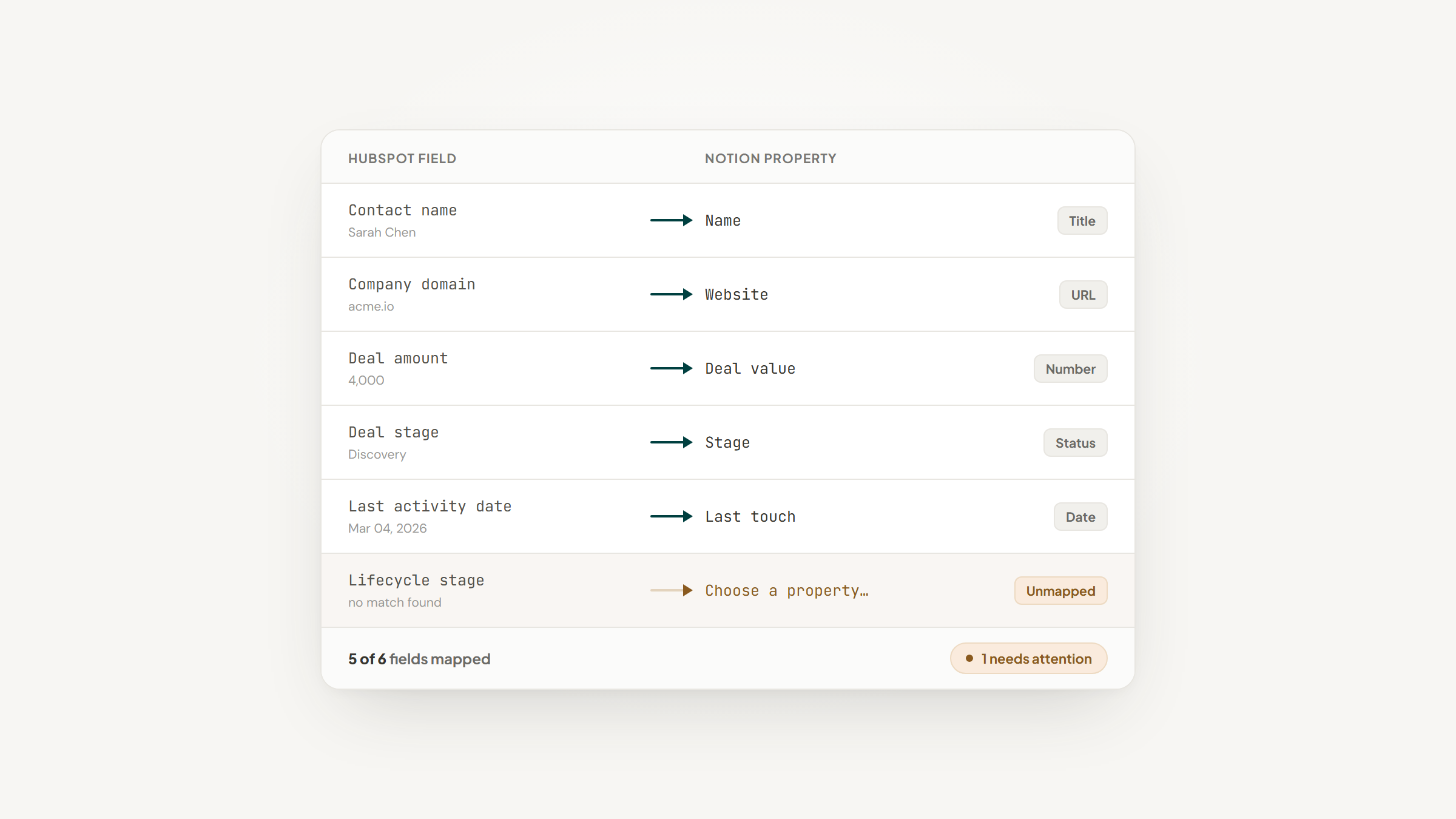
What it actually is: HubSpot's generic Data Sync engine pointed at Notion. The same framework connects Airtable, Smartsheet, Kintone, and Monday. HubSpot's own knowledge base gives the game away by grouping them: if you're connecting a spreadsheet app, such as Airtable, Smartsheet, Kintone, Monday.com, or Notion, HubSpot recommends an object for you. Notion is filed as a spreadsheet app, not as a system with pages, relations, and page bodies.
The mechanics are decent. Two-way sync, records updating within about ten minutes of a change, and the ability to map Contacts, Companies, Deals, Tickets, and more to Notion database rows. The initial sync can take days on a large dataset.
The catch is the money and the ceiling. Custom field mapping requires a paid Data Hub Starter subscription, priced at $7 a month on HubSpot's data pricing page today. Without it you take HubSpot's automatic field recommendations and live with them.
A two-star review from April 2026 is worth quoting, because it matches what the architecture implies: setting it up isn't easy, HubSpot doesn't embrace Notion's functionality and vice versa, and as far as that reviewer could tell it's just a sync for plain text.
The Other Two Listings
The remaining Notion entries in HubSpot's marketplace answer different questions, and both get mistaken for sync tools.
Notion MCP is built by Notion itself, has 600-plus installs, and costs nothing. It's a Model Context Protocol server that lets HubSpot's Breeze AI agents search, read, and create Notion pages by prompt. It is genuinely the one thing Notion ships into HubSpot. It is not a data sync, and it won't keep a contact list current.
Notion Sync by NoteLinker is third-party, small at 40-plus installs, and priced by contacting the partner. It's one-directional and display-only: it surfaces your Notion notes and tasks inline on a HubSpot contact or deal record by matching on email or deal name, without storing your note content.
Neither is wrong. Both are answers to questions most people searching this term aren't asking.
What People Actually Want
The May 2025 feature request on HubSpot's community reads like a spec, and it's the clearest statement of the real job.
The person filing it managed customer projects split across HubSpot for CRM and deals, and Notion for project docs and tasks. Their asks were specific: auto-create a Notion project space when a deal hits Closed Won, link Notion pages two-way to HubSpot company, deal, and contact records, and sync selected fields in both directions so Notion milestones surface on a HubSpot property.
Nothing on the market does that cleanly today. Understanding the gap between that spec and what's available is what stops you from buying a tool that solves a different problem.
How Do I Sync Data Between HubSpot and Notion?
Five routes exist, and they trade cost against control. Prices below came off each vendor's pricing page this month.
Method | Cost | What you get | The catch |
|---|---|---|---|
HubSpot Data Sync | Free to connect; $7/mo for field mapping | Two-way, ~10-min updates, HubSpot-maintained | Treats Notion as a spreadsheet; reviewed as clunky |
Zapier | Free (100 tasks/mo) · from $19.99/mo | Easiest to build; huge template library | Free polls every 15 min and caps you at two-step Zaps |
Make | Free (1,000 ops/mo) · Core $12 · Pro $21 | Cheaper at volume, visual builder | Free scenarios run no faster than every 15 min |
n8n | Cloud from €20/mo · self-host free | Full CRUD both sides, most control | Most technical; bills per workflow execution |
Direct API | Free, plus your time | Exactly what you want | You own pagination, dedupe, and breakage |
Unito also sells a genuinely bidirectional HubSpot-Notion sync with field-level mapping. We're not quoting a price because Unito doesn't publish one for this, and the third-party figures floating around contradict each other badly enough that repeating any of them would be guessing.
There is no single best way to connect HubSpot with Notion, only a best way for your volume. For most people that means Zapier or Make if you want it working this afternoon, Data Sync if you're already paying HubSpot and only need contacts mirrored, and the API only if the other routes have failed you.
Connect HubSpot to Notion With Zapier
This is the most common route, and the canonical recipe answers one of the most-searched versions of this question: how to add new HubSpot contacts to Notion databases.
The Build, Step by Step
Six steps, and step 2 is the one that trips almost everybody on their first attempt.
- Create a Notion internal integration at notion.so/my-integrations and copy the token, which starts with `secret_` or `ntn_`.
- Share your target database with that integration through the `•••` menu, then Connections, then Add connections. The token alone grants nothing until you do this, and it's where most first attempts fail.
- In Zapier, set the trigger to HubSpot's New Contact event and connect your HubSpot account.
- Set the action to Notion's Create Data Source Item, not Create Database Item, and pick your database.
- Map the fields you care about: name, email, company, and whatever else your database expects.
- Test with a real contact, then turn it on.
Two things worth knowing before you rely on it. On Zapier's free plan the HubSpot trigger polls every 15 minutes, so this is not real-time, and free Zaps are capped at two steps, which rules out any enrichment or branching in between. And this is one-way: HubSpot to Notion. Reversing it means building a second Zap, which is how you end up with a sync loop if you're careless.
Notion and HubSpot API Integrations
If you're building it yourself, the two APIs are more similar than you'd expect, and one recent change matters more than everything else.
Authentication works the same way on both sides. Notion uses an internal integration token sent as a Bearer header, and HubSpot uses a private app access token with granular scopes. Notion's quirk is the one from step 2 above: the token grants access to nothing until each database is explicitly shared with the integration.
Rate limits are where the two diverge.
Notion | HubSpot private apps | |
|---|---|---|
Burst | ~3 requests/second | 100 per 10 sec (Free/Starter) |
Higher tiers | Scales per workspace plan | 190 per 10 sec (Pro/Enterprise) |
Daily cap | Not published as a hard daily figure | 250k (Free) · 625k (Pro) · 1M (Enterprise) |
On overage | 429 or 529, with a `Retry-After` header | Standard rate-limit errors |
Notion's `Retry-After` header is genuinely useful: it tells you exactly how many seconds to wait, so a well-behaved client never needs to guess at backoff.
The change that breaks things is newer. Notion shipped API version 2025-09-03, introducing multi-source databases. The practical effect is that `/v1/databases/:id/query` is superseded by `/v1/data_sources/:id/query`, and the Search API's object filter changed from `database` to `data_source`. That's why Zapier's action is named Create Data Source Item rather than Create Database Item.
If you're writing a sync in 2026, you now need a discovery call to fetch and store the data source ID before you can query. Almost no guide currently ranking for this term mentions it, and real integrations broke over it.
What a Real Sync Has to Handle
The tutorials make this look like twenty lines of code. Three things decide whether it survives contact with production.
Pagination comes first. Both Notion's query endpoint and HubSpot's CRM list endpoints are cursor-paginated. A naive script that fetches once and stops silently truncates at page one, and you won't notice until someone asks where the rest of the contacts went.
Deduplication is second. You need a matching key on both sides, usually email for contacts and domain for companies. HubSpot's own Data Sync docs describe the rule plainly: the first record returned is syncable, the next one with the same identifier is treated as a duplicate. Skip this and every re-run creates fresh Notion rows.
Property mapping is third. Notion's Select and Multi-select options don't map one-to-one onto HubSpot's custom properties. This is boring and it's also exactly what's paywalled in both Data Sync and Unito, which tells you how much work it really is.
That third point is worth sitting with, because bad mapping doesn't fail loudly. It quietly produces two systems that disagree, and Gartner puts the average cost of poor data quality at $12.9 million a year across organizations. Your number is smaller. The mechanism is identical.
Notion as the Layer Over HubSpot
Here's the framing that makes this whole project worth doing, and it isn't "replace HubSpot."
HubSpot is good at being a CRM: contacts, deals, sequences, reporting, the pipeline your team is measured on. Notion is good at everything shaped like a document: the discovery call notes, the proposal, the onboarding checklist, the internal wiki explaining how this client likes to work.
Trying to make Notion a second CRM is how these projects fail. The people filing HubSpot feature requests aren't asking to leave HubSpot; they're asking for the project context to stop living in a different universe from the deal record.
So sync narrowly and deliberately. Push the deal record into Notion so project pages can relate to it. Surface a Notion project link back on the HubSpot deal. Resist syncing everything, because every extra field is another mapping to maintain and another place the two can disagree.
The cost of skipping that discipline shows up in the switching. Researchers writing in Harvard Business Review instrumented 137 people at three Fortune 500 firms and found the average worker bouncing between apps around 1,200 times daily, with the reorientation alone eating close to 9% of the working week. Two systems is fine. Two systems that don't know about each other is the tax.
The Leads HubSpot Was Never Meant to Hold
We should be straight about something: if you're running HubSpot, you don't need a Notion CRM, and we're not going to pretend otherwise.
There's one honest exception. Most people have a list that HubSpot's sales hub was never designed for and that would only clutter it: a personal referral list, a watch-this-account-before-it's-qualified tracker, a partner or vendor roster. One person in the Reddit thread below wanted exactly this for 30 to 40 partners and found every tool priced for thousands of records.
That's the narrow case Lead to Notion fits. It's our free Chrome extension: open a side panel next to whatever you're reading, type a name and a website, and it lands in a Notion database with the card title composed as Name x Company, a duplicate check, and date-stamped notes. It's free forever, needs no account, and keeps your token on your device.
The same honesty we've applied to HubSpot's app applies to ours: it isn't in the Chrome Web Store yet, so installing means a ZIP, Developer mode, and Load unpacked, and your database needs a few required fields mapped first.
It doesn't talk to HubSpot at all, and that's the point. It's for the leads that were never going into HubSpot in the first place. If that's not your situation, skip it entirely; the setup guide and the download will still be there if it becomes one.
Choosing a Method
The Reddit thread on pushing HubSpot data into Notion contains the most accurate sentence written about this topic. Asked whether it could be done, one commenter replied that "can I" questions about Notion are mostly answered with "no" or "only with an automation tool," and added, "Sucks, I know."
That's anecdotal and it's also the shape of the answer. In the same thread, another user evaluating a $40-a-month sync tool for a 30 to 40 record list decided it couldn't be justified, which is the other half of the lesson: match the tool to your actual volume, because most of these price for hundreds or thousands of records.
So pick on volume and direction. A handful of records moving one way is a free Zapier task. Contacts mirrored both ways with a HubSpot subscription you already pay for is Data Sync at $7. Anything with real logic in the middle is Make or n8n. And a genuinely custom two-way sync is the API, plus a weekend, plus the data source change nobody warned you about.
One thing to check before you build any of it: Notion automations may already cover the Notion-side half of your workflow, which shrinks what the sync has to carry.
And if this project is really a symptom of doubting your CRM choice, Notion vs Monday and Notion vs ClickUp tackle that question directly, alongside the rest of our blog.
Frequently asked questions
Not a purpose-built one. Notion's integration gallery lists no CRM at all, and HubSpot's community has open feature requests for a native integration dating to 2024. What exists is HubSpot's generic Data Sync engine with a Notion connector that HubSpot built and maintains, which is as close to official as it gets. HubSpot's own documentation groups Notion with spreadsheet apps like Airtable and Smartsheet, which tells you how deep the integration goes.
Turn Notion into your CRM
Lead to Notion is a free Chrome extension. Save leads to your Notion database in one click, add notes, and track your pipeline. No account, no server.