
Coda vs Notion in 2026: Which Fits Your Lead Management?
Coda is now Superhuman Docs. A 2026 comparison of pricing, formulas, Packs and lead tracking, plus what actually breaks in the rebrand.
If you are comparing Coda and Notion right now, the first useful thing to know is that one of them changed its name six weeks ago and most published comparisons have not caught up.
Coda is now Superhuman Docs. The product is the same product, your docs still work, and `coda.io` links still resolve, but the name, the domain and the look have all changed. Every ranking comparison we read while researching this piece still calls it Coda, which tells you how recent the change is.
Underneath the rebrand, the original Coda vs Notion question is unchanged and still worth answering. Both tools merge documents and databases into one surface. They just disagree about which half comes first, and that disagreement decides which one suits how you work.
Whether you search for it as Coda vs Notion or Notion vs Coda, the comparison is the same one, and the name change does not alter it.
We make a free tool that pushes leads into Notion, so we have an interest in one side of this. We have tried to keep the comparison honest anyway, and Superhuman Docs genuinely beats Notion in places we will name.
Coda Is Now Superhuman Docs
This is recent enough to be worth setting out properly, because the corporate history behind the name is what makes it confusing.
Grammarly acquired Coda in December 2024, and Coda's co-founder Shishir Mehrotra became chief executive of the combined company. Grammarly then acquired Superhuman, the email client, in June 2025.
In October 2025 the parent company renamed itself Superhuman and pulled four products into one suite: Grammarly's writing assistance, Coda, Superhuman Mail, and an assistant called Superhuman Go. Coda kept its own name for another eight months.
On 8 July 2026 that ended. Coda became Superhuman Docs, moving to `docs.superhuman.com`, with a refreshed design, a new Mac desktop app and some genuinely new capability. The company's own framing is worth quoting because it is the reassuring part: "This is an evolution, not a replacement."
For most users it really is. Docs, tables, Packs, automations and formulas all carry over untouched, your existing links redirect, and plans and pricing are unchanged. A handful of things do break, and we have listed them further down, because nobody else seems to have.
What Notion Is, in One Section

The Notion homepage, captured August 2026.
Notion starts from the page. You write something, and if it needs structure you attach a database to it, or turn it into a row in one.
That ordering shows up everywhere. Notion's hierarchy is pages inside pages, its databases are collections of pages with properties, and its sharing model is built around who can see which page. It is a wiki that grew a database, and it behaves like one.
The practical consequence is a gentle learning curve and an enormous amount of shared knowledge. Templates, tutorials and community answers exist for nearly anything you want to build, which matters more than any single feature when you are stuck at 11pm.
What Superhuman Docs Is

Coda's homepage announcing the change to Superhuman Docs, coda.io (August 2026).
Superhuman Docs starts from the table. A doc is a canvas, and the tables inside it behave like a small application: formulas reference whole tables and ranges, buttons run actions, and Packs pull in live data from other services.
The difference is not cosmetic. In Notion, a formula generally works within a row. In Superhuman Docs, a formula can operate across entire tables the way a spreadsheet function operates across a sheet, which is why people build genuine internal tools in it.
The July release added table pages, where a table gets its own full-page home rather than sitting inside a document, plus AI-assisted table creation and a simpler route to cross-doc setup. That direction, more room for structured data, tells you where the product is heading.
Notion AI vs Coda AI has changed shape since the rebrand, and in Superhuman Docs' favor. Docs AI now appears on its free tier, while Notion reserves its real AI features for the Business plan, a gating question we unpick in Notion AI vs ChatGPT.
At the entry tier, then, Notion AI vs Coda AI is a packaging question rather than a capability one.
Pricing: Per Member vs Per Doc Maker
Coda vs Notion pricing is where most comparisons go wrong, and the error is not small. The two products bill for different people, so comparing the headline numbers directly gives you an answer that can be off by an order of magnitude.

Notion plan pricing, captured August 2026.

Superhuman Docs pricing, coda.io (August 2026).
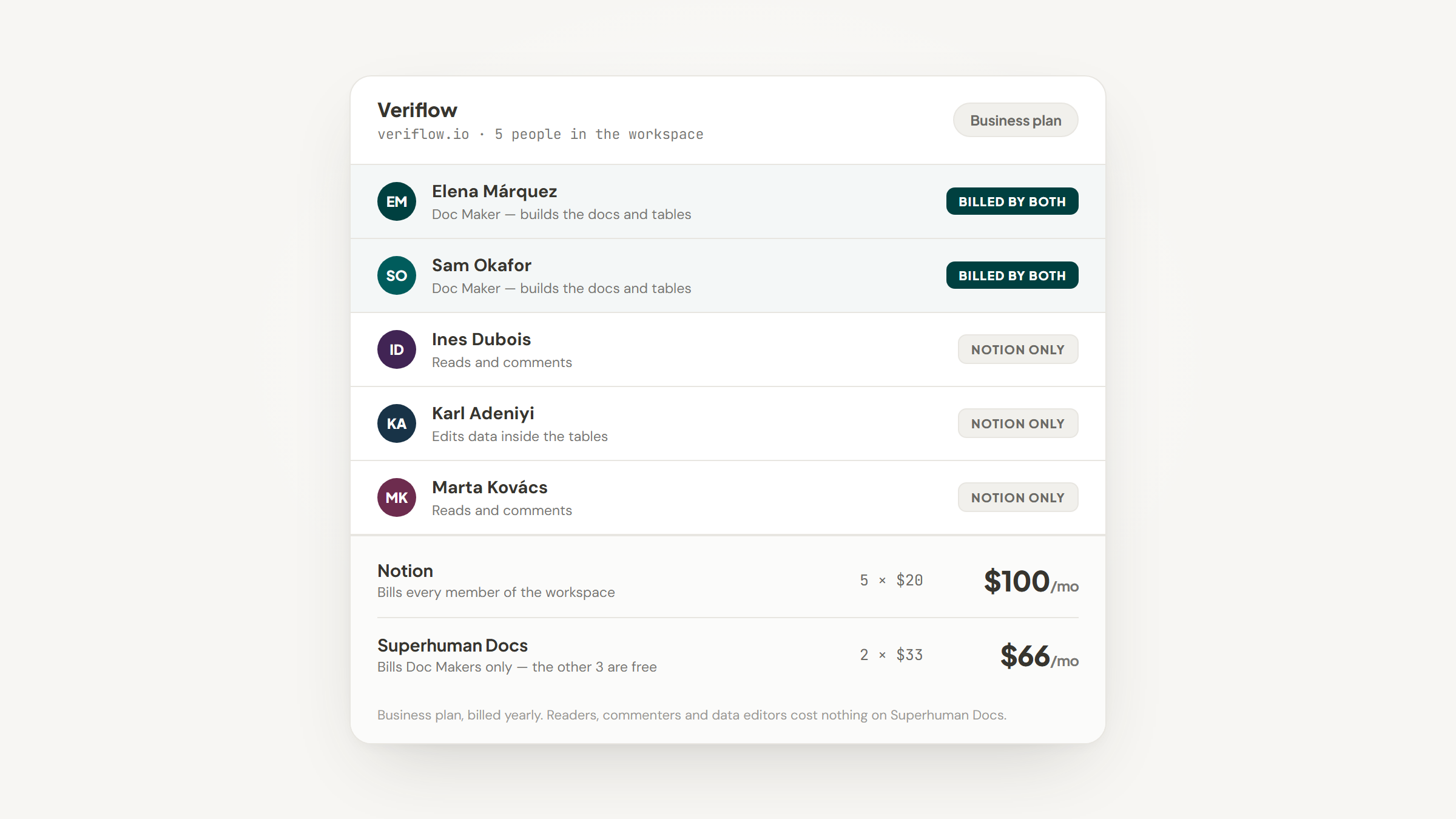
Notion counts members. Everyone who works in the workspace occupies a paid seat, so a ten-person team on Plus is ten seats.
Superhuman Docs counts Doc Makers. You pay only for the people who build docs. Everyone who reads them, comments on them or edits the data inside them costs nothing, however many of them there are.
Notion | Superhuman Docs (formerly Coda) | |
|---|---|---|
Free tier | $0 per member/month | $0, collaborative docs and automations |
Entry paid tier | Plus, $10 per member/month | Pro, $12 per Doc Maker/month |
Next tier | Business, $20 per member/month | Business, $33 per Doc Maker/month |
Top tier | Enterprise, custom | Enterprise, custom |
Monthly billing | Higher; yearly saves up to 20% | Pro $15, Business $40 |
Who pays | Every member of the workspace | Only people who build docs |
AI included | Business plan and above | Docs AI on the free tier |
Run that through a real team and the gap opens up. A ten-person team where two people build and eight only read costs $200 a month on Notion Business, and $66 a month on Superhuman Docs Business, because only the two builders are billed.
Flip the ratio and it reverses. Ten people who all build still costs $200 on Notion, but $330 on Superhuman Docs. The question is not which is cheaper, it is what share of your team creates rather than reads.
Tables, Formulas, and Where Each One Stops
Superhuman Docs wins this on capability, and it is not particularly close.
Formulas reference entire tables and ranges rather than being confined to a row, buttons can have their labels generated by formula rather than only their behavior, and automations chain more freely. If you want a doc that behaves like an application, this is the tool that will let you.
Notion's database engine is genuinely good but more constrained. Relations, rollups and formulas cover the great majority of real needs, and the ceiling only appears when you try to compute across a whole table at once.
Neither enforces structure the way a true relational tool does, and if that is the thing you actually want, a third option is worth weighing, which we do in Airtable vs Notion.
There is a caution worth attaching to all of this, and it applies to whichever tool you pick. Research into spreadsheet errors by Raymond Panko found that recent field audits of real organizational spreadsheets turned up errors in at least 86% of them, with cell error rates around 1% to 2.5%, and that error rates did not improve with experience.
The finding that should give any formula-builder pause is about confidence rather than competence. In one experiment, developers put their median chance of having made an error at 10%; in fact 86% of them had made one. Powerful formula tools do not remove that risk, they enlarge the surface it runs on, which is an argument for building the simplest thing that works.
Packs, Integrations, and Getting Data In
Superhuman Docs uses Packs: modules that pull live data from outside services directly into a table, so a doc can hold current information rather than a paste from last Tuesday.
Notion approaches this through connections and its API. Native connections cover the common services, and the premium ones require the Business plan, which is worth checking before you plan around them.
Neither approach solves the problem people actually have, which is getting information in from the open web rather than from another SaaS product. Both assume the data already lives in a system with an API.
Rule-based updates inside the tool are a separate question again, and Notion's native ones have sharper edges than most people expect, which we map out in our Notion automations guide. Packs cover more ground here, at the cost of being a concept you have to learn first.
What Genuinely Breaks in the Rebrand
Almost everything survived the move, which is why this list is short. It is not empty, though, and none of these are mentioned in the comparisons currently ranking.
- Check any app configured to allow embeds from `coda.io`, in both directions, and add `docs.superhuman.com` to it.
- Update data loss prevention tools that allow-list `coda.io`, or file uploads and copying will start failing.
- Re-apply browser settings tied to `coda.io`, including pop-up permissions.
- Reconnect the Slack app, now called Superhuman Docs for Slack, if links stop unfurling.
- Note that publishing new docs to the Coda gallery ended on 8 July 2026, though previously published docs stay reachable.
Two things explicitly do not break. Existing API endpoints such as `coda.io/apis/v1/docs` continue to work, with only `browserLink` fields returning the new domain, and single sign-on and provisioning need no changes at all.
If you are on Windows, one gap is still open: the new desktop app shipped for Mac in July, and the Windows version is described as in development.
Ease of Use, and Who Actually Sticks With It
Capability and pleasantness are different things, and this is where Notion pulls ahead.
The most useful outside assessment we found came from Thomas Frank, who builds Notion systems professionally and so had every reason to be unimpressed. Writing on r/Notion, he described Coda's formulas and databases as far more powerful, since you can reference entire tables and ranges and even automate button labels.
His reservation was about daily life with the tool. The user experience felt less smooth to him, the mobile app was weak when he last tried it, and while he loves Coda for building something complex, he prefers Notion's balance of usability and flexibility for everyday work. It is one practitioner's view on a forum rather than a study, but it matches what the rest of our research turned up.
There is a broader point underneath it. Work by Scaffidi, Shaw and Myers, projecting forward from 2005, estimated that by 2012 more than 55 million people in American workplaces would be building with spreadsheets and databases, against roughly 13 million who would call themselves programmers.
The people building in these tools are overwhelmingly not developers. That is why approachability beats capability in practice: the tool people find inviting gets filled with real data, and the more powerful one gets abandoned half-configured.
The same trade shows up when Notion is weighed against a dedicated task platform, where the richer tool often loses to the one the team will open daily, a pattern we followed through in Notion vs ClickUp.
Which One Actually Tracks Leads Better
Both tools can hold a pipeline, so the question is which one you will still be updating in three months.
Superhuman Docs is the better modeling environment. If you want weighted forecasting with your own logic, custom stage rules and calculations spanning several tables, its formula engine will do things Notion cannot.
Notion wins on the thing that decides it. A CRM fails from empty records far more often than from weak formulas, and Notion has more paths for getting data in: more templates to start from, a larger community answering questions, and a wider set of third-party tools built around its API.
The gap either tool leaves open is the same one. Neither can capture a lead from the page you are looking at, so someone still switches tabs and types the name, the company and the URL by hand, every time.
That is the specific job we built Lead to Notion for. It costs nothing, runs as a browser panel, and one save sends the lead through to Notion with the deal value, source and stage filled in.
The piece that matters for forecasting is the Pipeline tab. It totals deal value by stage and applies fixed win probabilities of 10% at Lead, 25% at Qualified, 50% at Proposal and 75% at Negotiation, so you get a weighted number without building the formula yourself.
The weights are fixed and keyed to those four stage names, which is a real constraint rather than a footnote. If your stages are named differently, you map or rename them first, and if you want different probabilities, Superhuman Docs is genuinely the better tool for that.
Three other limits are worth knowing before you try it. Installation is manual, because no Web Store listing exists yet. Website, LinkedIn URL, Deal Value, Service and Source are required rather than optional. And every lead arrives at the Lead stage, so you move it onward from the note tab.
Calling it a CRM would overstate it, too. It is a capture layer: Notion holds the pipeline, and the extension only fills it.
Coda vs Notion: Which One Should You Pick?
The honest answer depends on two things: how much of your team builds, and how complex your logic really needs to be.
If this describes you | Pick | Why |
|---|---|---|
Most of your team reads, a few build | Superhuman Docs | You pay only for Doc Makers, which can be a fraction of the cost |
Everyone builds their own pages | Notion | Per-member pricing works out cheaper and simpler |
You need formulas across whole tables | Superhuman Docs | Its formula engine genuinely goes further |
You want to start from a template today | Notion | The community and template library are far larger |
You are running a lightweight CRM | Notion | Easier to fill, and more tools connect to it |
You are building an internal tool | Superhuman Docs | Docs behave like applications, with buttons and Packs |
You work mostly on mobile | Notion | A weaker mobile app is the most consistent criticism of Coda |
If you are choosing for a young company where nobody has time to maintain a system, weight that last column heavily. We work through what survives contact with an early-stage team in our Notion for startups guide.
Making the Call Without Overthinking It
Coda vs Notion comes down to less than the time you would spend agonizing over it, because both tools are good. One models better; the other gets used more.
Choose Superhuman Docs if the ratio of readers to builders on your team is high, or if you have a genuine engineering problem dressed up as a document. Choose Notion if you want something the whole team will actually adopt, and if what you are building is a system of record rather than an application.
Whichever you pick, decide it on the ratio and the mobile question rather than the feature grid. Those two predict whether a tool is still in use next quarter better than any comparison table, including the one above.
If it turns out to be Notion, and leads are what you are tracking, the entry problem is worth solving first. The setup guide handles the fiddly part, creating an integration and giving it access to your database.
A lead then lands in your database in roughly ten seconds. Download the extension and give it your pipeline.
Frequently asked questions
No. Coda was renamed Superhuman Docs on 8 July 2026 and continues as the same product. All docs, tables, Packs, automations and formulas keep working, existing `coda.io` links redirect automatically to `docs.superhuman.com`, and plans, pricing and billing are unchanged. The company describes it as an evolution rather than a replacement, and in practice that is accurate.
Turn Notion into your CRM
Lead to Notion is a free Chrome extension. Save leads to your Notion database in one click, add notes, and track your pipeline. No account, no server.