
Top 7 CRM Twitter Tools in 2026 to Capture Leads From X
The 7 best CRM Twitter tools in 2026, with live pricing, which X integrations are real, and why the dedicated Twitter CRM category disappeared.
You reply to someone's post, they DM you, and a decent conversation happens. Three weeks later you cannot find it, because your DM list has moved on and you never wrote their name anywhere else.
That is the whole problem. Not automation, not scheduling, not analytics. Just keeping hold of the people you meet on a platform that was never designed to help you keep hold of anyone.
The honest version of this topic is that the dedicated Twitter CRM tool has mostly gone. What remains is a set of general CRMs with an X integration bolted on, of varying freshness, and this list covers the seven worth knowing plus what each actually connects to.
What Is a CRM Twitter Setup?
A CRM Twitter setup means connecting X (formerly Twitter) to a system that stores people as records rather than as conversations. You capture the person, attach some context, and get a reminder later.
There are three shapes it can take. A browser extension that pushes a profile into a CRM while you are looking at it, a native integration where the CRM pulls X data through the API, or a manual habit where you copy what matters into a database yourself.
The distinction matters more than it used to, because the middle option now costs the vendor money per record. That is a recent change, and it explains almost everything about the state of this category.
Which shape you want depends on where the record is meant to end up, and the same question applies to any CRM you are already running, as our HubSpot walkthrough sets out.
What Happened to Twitter CRM Tools
Two things happened, and neither is widely reported in the roundups still ranking for this topic.
The first is that the flagship product died. BlackMagic.so, the best-known dedicated Twitter CRM, now serves a single page reading "BlackMagic is shutting down on July 1, 2026." Active subscriptions were canceled automatically. That date has passed, so any list still recommending it is sending you to a closed business.
The second is pricing. X's API pricing documentation states that the API "uses pay-per-usage pricing" with "No subscriptions," charging $0.005 per Post read, $0.010 per User read and $0.015 per post created, with reads of your own data at $0.001. Pay-per-usage is capped at three million Post reads per monthly billing cycle, above which you need Enterprise. The page describes no free tier.
Read that as a vendor rather than a user. A CRM that syncs your X contacts is now paying per record, forever, for a feature most customers treat as a nice-to-have. That is a hard business case, and it is why the surviving integrations tend to be thin.
Metered billing is spreading well beyond X, and it changes how you should budget for any tool that resells someone else's API, a shift we unpick in our ChatGPT comparison.
That economics problem explains the third thing you will notice below: several of these integrations have not been meaningfully updated in years, and their marketing pages still call the platform Twitter.
The Best CRM Twitter Tools in 2026
The seven below all connect to X in some form, verified on each vendor's own site rather than assumed from a directory. Pricing was read off each vendor's pricing page on 19 August 2026.
Tool | Best for | Key features | Main limitation | Pricing (from) | Rating |
|---|---|---|---|---|---|
folk | One-click imports from X profiles | X Chrome extension, pipeline views, team sharing | Priced per member, so teams add up | $24/member/month | ★★★★★ |
Breakcold | Working X alongside other channels | X among its connected platforms, unified feed | Token usage billed on top of the base plan | $59/month flat | ★★★★★ |
Kondo | Handling a heavy X DM load | Keyboard-driven inbox covering X and five others | No longer X-specific in any sense | $28/user/month | ★★★★☆ |
Zoho CRM | A full CRM with social monitoring built in | Monitor mentions, convert interactions to leads | Its Twitter page never acknowledges the rename | $14/user/month | ★★★★☆ |
HubSpot | Free CRM plus publishing and reporting | Built-by-HubSpot certified app, social reporting | Publishing-focused rather than capture-focused | $0 (free, 2 users) | ★★★★☆ |
Notion + Lead to Notion | Keeping X contacts in a database you own | One-click capture from any page, duplicate guard | No X API integration at all | $0 (free forever) | ★★★★☆ |
Agile CRM | A cheap all-in-one with a social tab | Twitter widget on the contact record, free tier | Integration page is visibly years out of date | $0 (free, 10 users) | ★★★☆☆ |
Ratings reflect how current and useful each X connection actually is, which is why a cheap tool with a stale integration ranks below a free one that is honest about having none.
folk

Overview: The clearest first-party X support on this list. folk's integrations page lists an "X (ex twitter) Chrome extension" for one-click imports, and it is one of the few vendors that has bothered to update the name.
Key features:
- Chrome extension that imports an X profile into folk in one click
- Shared pipeline views so a team can work the same contacts
- Enrichment that fills in details the profile does not give you
Pricing: Standard is $24, Premium $48 and Enterprise from $80 per member per month billed yearly, which is $288, $576 and $960 a year. Monthly billing runs $30, $60 and from $100.
Pros: genuine X extension, clean interface, good team collaboration
Cons: per-member pricing mounts up quickly, no free plan, X is one input among many
Why it's a good pick: It treats X as a legitimate capture source rather than a legacy checkbox, which is now rare enough to be the deciding factor.
Breakcold

Overview: A social-selling CRM that lists X among the platforms it manages contacts from, alongside LinkedIn, email, WhatsApp, Telegram and Instagram. Its pitch is a single feed of what your prospects are doing across all of them.
Key features:
- Contacts and conversations from several platforms in one view
- Activity feed for warming a prospect before you reach out
- Contact enrichment comes with the plan instead of arriving as a credits upsell
Pricing: There are no tiers, just a $59 monthly base. That covers one seat and two connected accounts; beyond those, seats and accounts each add $10 a month, and token consumption is charged separately. Trials run 14 days.
Pros: flat base price, genuinely multi-channel, strong for founder-led selling
Cons: the token line makes your monthly total unpredictable, poor value at low usage, assumes you are actively prospecting
Why it's a good pick: If X is one of three or four places you talk to prospects, consolidating them beats running a separate tool per platform.
Kondo

Overview: Built for people whose inbound arrives as direct messages. Its homepage leads with "Superhuman for DMs" and shows its supported channels as a row of icons that includes X, alongside iMessage, WhatsApp, Telegram, Instagram and LinkedIn.
Key features:
- Keyboard-driven triage across six messaging channels including X
- Tags and follow-up reminders attached to a conversation
- A snippet library for the answers you find yourself retyping
Pricing: Per user per month, the ladder runs $28, then $36, then $52. Every tier carries a money-back window of 14 days.
Pros: very fast for high message volume, reminders live on the conversation, covers more than X
Cons: breadth means X gets no special treatment, per-user pricing, overkill for light DM traffic
Why it's a good pick: DMs are where X conversations actually happen, and this is the only tool here designed around that rather than around profiles.
Zoho CRM

Overview: A full-featured CRM with social monitoring built into the product rather than bolted on. Its Twitter page claims you can react, reply and post from inside the CRM, monitor mentions and keywords, and convert interactions into leads automatically.
Worth one caveat before you rely on it: that page never acknowledges the rename to X, states no API costs or limits, and does not say which Zoho plan includes the feature. Confirm the specifics with Zoho before buying on the strength of it.
Key features:
- Monitor brand mentions, keywords, hashtags and specific accounts
- Convert social interactions into CRM leads without manual entry
- Reply with full contact and deal history visible alongside
Pricing: There is a free edition, above which the per-user monthly rate climbs through $14, $23 and $40. Zoho's lighter product, Bigin, sits under all of them at $7.
Pros: deepest social feature set here, cheap for what it does, free edition available
Cons: documentation is stale, plan gating unclear, a large product to adopt for one channel
Why it's a good pick: On paper it does more with X data than anything else on this list, provided you verify that the implementation matches the marketing.
HubSpot

Overview: The default free CRM, with a Twitter app in its own marketplace that is both Built by HubSpot and HubSpot Certified. The app covers cross-network publishing, scheduling, bulk uploads and social reporting.
The gap is that it is a publishing tool more than a capture tool. It helps you post and measure; it does less to turn someone who replied to you into a tracked contact.
Key features:
- Publish, schedule and bulk-upload posts across networks
- Social reporting alongside the rest of your CRM data
- Free CRM underneath, with no expiration date
Pricing: Two users cost nothing and no card is requested. The Starter tier is promoted at $7 a seat monthly, but a struck-through $20 sits beside it on the same page, so treat $7 as a limited offer rather than the list rate.
Pros: genuinely free tier, certified first-party app, scales into a full platform
Cons: publishing rather than lead capture, social tools sit in the marketing side, listing still says Twitter throughout
Why it's a good pick: If you want one system for the whole funnel and X is a publishing channel rather than a prospecting one, this is the sensible default.
Notion + Lead to Notion

Best for: Owning X contacts outright
Overview: Being straight about the fit: we have no X integration. Our free Chrome extension does not read the API, does not sync followers and does not import DMs. What it does is let you save a person into your own Notion database from a side panel while their profile is open in front of you.
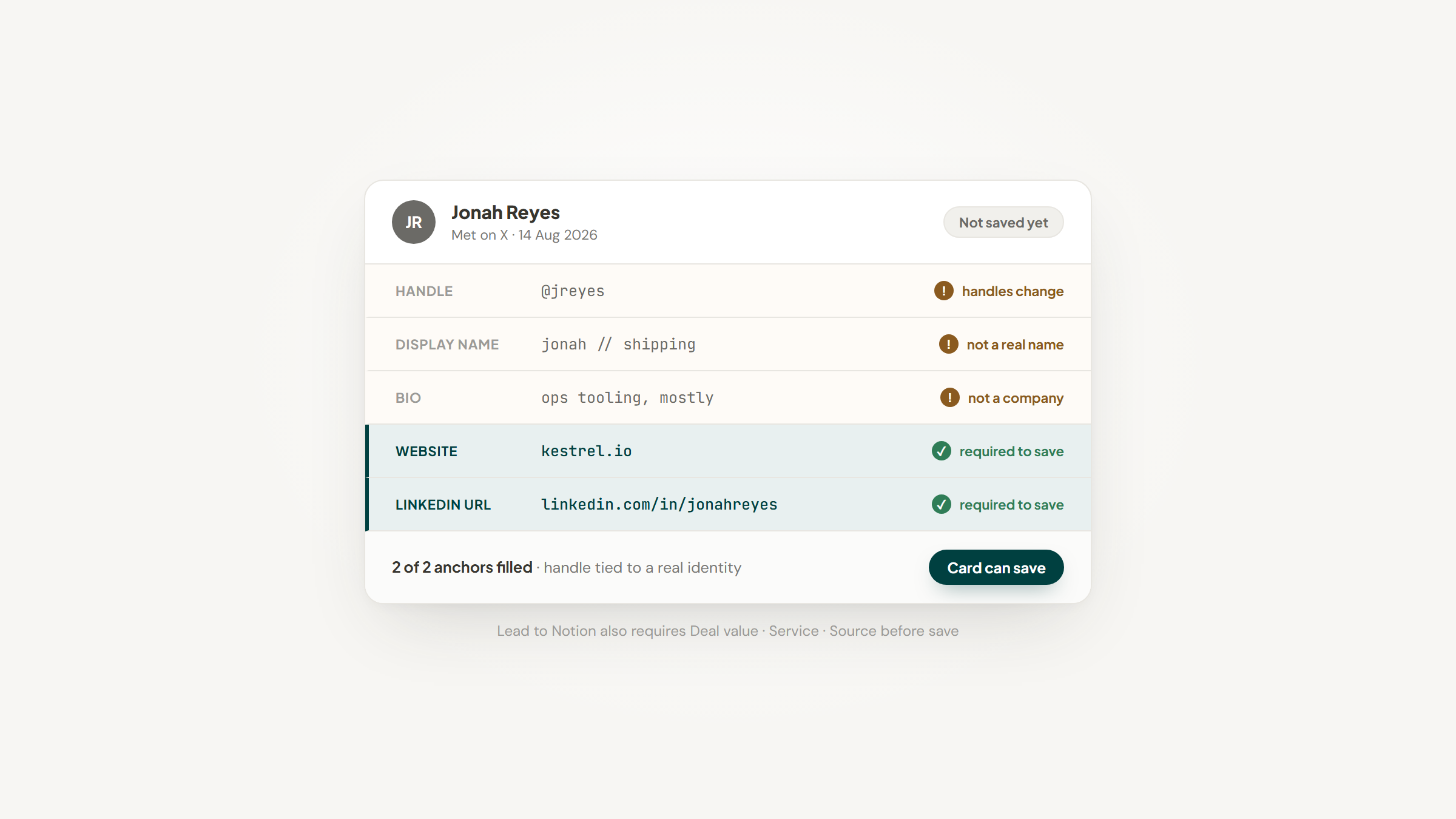
For X specifically that turns out to matter, because an X handle on its own is a thin record. Handles change, display names are not real names, and a bio is not a company. The extension requires a Website and a LinkedIn URL before a card will save, which forces the handle to be attached to an identity you can still find in a year.
The extension checks those two fields against your existing records before saving and names the card it matched, so the same person met twice on two platforms does not become two contacts.
Because the database is yours, an X-specific column costs nothing to add. Put the handle in its own field, sort by last contact, and the platform becomes one source feeding a record you control rather than the place your contacts live.
Key features:
- Website and LinkedIn URL required on save, so a handle is never the only identifier
- Duplicate guard on both fields, naming the existing card when it finds a match
- One-click capture from a side panel without leaving the profile
- Your schema is the schema: add a column for the handle and the extension picks it up
- Notes append to the card with today's date already in place
- No charge however many contacts you add, and nobody is billed by the seat
Pricing: Nothing, permanently. There is no tier list, no trial clock and no payment details to enter. Notion is likewise free for a single user, and only a growing team reaches its $10-a-member entry tier.
Pros: costs nothing, records you can export, no dependency on X's API or its pricing, custom fields, open source
Cons: no X integration whatsoever, manual capture only, install is not one click
How to start using it:
- Begin in Notion: build the database and give it a column reserved for the X handle.
- Pull the newest release archive off GitHub and unpack it where it can stay put.
- In `chrome://extensions`, switch on Developer mode, then Load unpacked and choose that folder.
- Mint an integration on notion.so/my-integrations, then authorize it against the database through the ••• menu.
- Supply the token and database ID in settings, confirm with Test connection, and align each field to a column.
Two honest limits. Five fields are mandatory (Website, LinkedIn URL, Deal Value, Service and Source), which suits a researched prospect rather than a passing handle. Every saved card also begins life in the Lead stage whatever the relationship is really worth, and you reposition it later from the Add note tab. Our setup guide walks through the authorization step people most often miss.
Why it's a good CRM Twitter tool: It is the only entry here whose usefulness does not depend on X's API pricing, because it never touches it.
Final verdict: Pick it if you want X contacts to survive the platform and you are willing to save them by hand. Skip it if you need mentions monitored or DMs synced, because that is not what this is. Notion does the CRM work; we only fill it.
CTA: Download free and connect your database.
Agile CRM

Overview: An inexpensive all-in-one CRM with a Twitter widget you add to the contact record, authorize against your account, and use to follow and interact without leaving the CRM.
Its integration page is the clearest illustration of this category's problem. It still describes Twitter as a network where "thousands more are signing up every day," quotes the pre-2023 mission statement, and mentions the rename nowhere.
Key features:
- Twitter widget added per contact from the Social tab
- Free tier covering up to 10 users
- Broad feature set including marketing and service modules
Pricing: Free for up to 10 users at $0 with no card required. Paid tiers start from $8.99, then $29.99 and $47.99 per user per month.
Pros: cheapest paid entry here, unusually generous free tier, wide feature set
Cons: integration documentation is years stale, widget-based rather than synced, dated interface
Why it's a good pick: The free tier makes it a low-risk way to test whether social context on a contact record changes anything for you, as long as you expect a dated experience.
How We Chose These Tools
One rule did most of the work: any X integration claimed here had to be verifiable on the vendor's own site, never in a roundup or a directory. A tool with no integration could still earn a place, but only by saying so plainly rather than by implying one.
That standard removed several names appearing on competing lists. One well-known CRM was cut because its own app directory offers nothing first-party for X, listing only outside apps that handle advertising attribution. A user in r/CRM put the same point plainly while hunting for a CRM with social integrations, noting that the obvious modern candidates serve the CRM side but do not offer the social side.
The same standard meant including tools whose integration is real but tired. Agile CRM and Zoho both stayed in, with the staleness stated in the entry, because a working-but-dated integration is more useful to you than a polished page describing a product that no longer exists.
Our own entry was written to the same rule, which is why Lead to Notion is listed as having no X integration at all rather than being credited with one it does not have.
One vendor was dropped for a duller reason. Nutshell has a genuine Twitter integration and is the only vendor checked that acknowledges the rename, with its page headed "Integrate X With Nutshell / Formerly Twitter," and its own listing shows the connection is delivered through Zapier rather than natively. Its sales chat panel covers a third of every screenshot we could take, so it earns this mention rather than an entry.
What to Look For in a CRM Twitter Tool
Three questions separate a useful integration from a checkbox.
Ask what the integration actually moves. There is a large difference between publishing posts, monitoring mentions, and creating a contact record from someone who talked to you. Most tools marketed for this do the first two and quietly skip the third, which is the one that matters for lead capture.
Ask when the vendor last touched it. Given what X's API now costs per request, an integration nobody has updated in three years is a maintenance liability rather than a feature. A page that has not noticed the platform changed its name is a reasonable proxy for how closely it is being watched.
Ask what happens to your records if the integration dies. The category has already lost its flagship product this year, so assume any given connection may stop working and check that you can export the contacts it created. Whichever tool you pick, the automation you build around it should be portable too.
None of these appear in a feature comparison, which is exactly why they decide whether the thing still works next year.
How Much Does X Lead Capture Cost?
Pricing splits by whether you are paying for a CRM that happens to touch X or for a workflow that leans on it heavily.
Monthly cost per person | What sits here | What you get |
|---|---|---|
$0 | HubSpot's free tier, Agile CRM's free tier, a Notion database with our extension | Manual capture, or publishing without prospecting |
$8 to $30 | Agile CRM paid, Zoho CRM, folk's entry tier, Kondo | A real CRM with a working social connection |
$30 to $60 | Breakcold's flat plan, folk Premium | Multi-channel consolidation and enrichment |
Metered on top | Anything reading X data at volume through the API | Per-request billing at X's published rates |
The last row is the one that surprises people. If a tool syncs X data heavily on your behalf, that cost exists whether you see it itemized or not, and it is usually recovered through your subscription or a token allowance.
Comparing this against running the whole operation inside one workspace is reasonable too, since a work platform charges per member before any CRM function switches on, which is the trade-off we set out in our ClickUp comparison.
Is X Still Worth Prospecting On?
Worth asking honestly, because the answer shapes how much you should spend here.
Pew Research Center's social media fact sheet puts X usage at 21% of US adults, down from 23% in early 2021, against 32% for LinkedIn. Among adults aged 18 to 29 the figure is 33%, falling to 10% for those 65 and over. It is a real audience, and a smaller and older-skewing one than its cultural presence suggests.
What that argues for is proportion. X is worth capturing from if your buyers are visibly there, and it is not worth building a stack around. One tool that already does your CRM job, with an X connection that works, beats a specialist purchase.
The second implication is about ownership. A platform whose API terms and pricing have changed twice in three years is not a safe place to keep the only copy of who you know.
Getting X Contacts Somewhere Permanent
Work backwards from what you already run.
If you have a CRM, use its X connection before buying anything: Zoho if you want monitoring, HubSpot if you mostly publish, Agile CRM if you want to test the idea for free. If X conversations arrive as DMs, Kondo is built for that specifically. If you work several social channels at once, Breakcold consolidates them. If you want the cleanest first-party import from a profile, folk has it.
Whatever you choose, do the capture at the moment of the conversation rather than at the end of the week. A GrowthHacking user described exactly this failure, losing track of who they had DM'd and who had engaged.
The replies on that thread converged on something simple: a weekly review block and a tagged list beat trying to hold it in your head. It is small and anecdotal, but the advice matches what the tools here automate. For contacts that move to email afterwards, the routes into a database matter as much as the X connection did.
If you would rather those contacts sat in a database you own, with no dependency on what X charges next year, that is what we built. Download free, point it at your Notion database, and save the person while their profile is still on screen.
Frequently asked questions
Not really, not any more. BlackMagic, the best-known dedicated Twitter CRM, shut down on 1 July 2026, and the category did not replace it. What exists in 2026 is general CRMs with an X integration of varying quality, which is why this list is made up of those rather than of specialist tools.
Turn Notion into your CRM
Lead to Notion is a free Chrome extension. Save leads to your Notion database in one click, add notes, and track your pipeline. No account, no server.