
Notion AI Review 2026: Is It Worth It for Lead Work?
A practical Notion AI review for 2026: what it really costs, where it works, where it fails on database records, and whether it is worth $20 a seat.
Reviews of Notion AI tend to answer the wrong question. They compare it to ChatGPT, decide it is less capable, and stop there, which misses why anyone would pay for it: Notion AI is not competing on raw intelligence, it is competing on already being inside the workspace where your notes live.
The harder question is whether that proximity is worth $20 per member per month, because that is what it actually costs and almost no review says so plainly. We took the capability question apart separately in Notion AI vs ChatGPT; this piece is about whether the price makes sense.
This Notion AI review is aimed at one use case in particular: people running a pipeline or a contact database in Notion who want to know whether the AI earns its place. Our own product writes leads into Notion databases, so we work in Notion every day and have a stake in it being useful. We have tried to be straight about where it is not.
Everything below was checked against Notion's live pricing and product pages in August 2026.
What Notion AI Actually Is in 2026
Notion AI is a set of features spread across the workspace rather than a single chat window, and the pieces do quite different jobs.
Notion Agent is the conversational layer. You ask it to do something, and it can create and edit pages and databases using context from your workspace and connected apps rather than answering in the abstract.
AI Meeting Notes transcribes conversations, summarizes them and pulls out the points that matter. Enterprise Search looks across your workspace and connected tools like Slack and Google Drive in one query. Research Mode produces longer reports on a topic.
Underneath those sit the smaller pieces you meet more often: AI blocks that draft or rewrite text inline, Autofill that populates database properties, and formula generation.
Two newer additions are worth flagging because they are billed differently. Custom Agents run on schedules or triggers and complete multi-step work on their own, and Workers, still in beta, let you extend Notion with custom code to build agent tools and sync external data.
What It Costs, and the Part Most Reviews Miss

Notion's pricing page showing Notion AI on the Business plan, notion.com (August 2026).
Notion AI pricing is the thing to get right before anything else, and it starts with a fact most reviews skip. There is no way to buy Notion AI on its own.
Look at Notion's plan cards and both Free and Plus list exactly one AI line: "Trial of Notion AI." The features people mean when they say Notion AI, the Agent, Meeting Notes and Enterprise Search, appear only when you reach Business at $20 per member per month.
So the honest price of Notion AI is the difference between what you pay now and $20 a seat, multiplied by everyone in the workspace. A five-person team on Plus moves from $50 to $100 a month, and every one of those five is billed whether they touch the AI or not.
Plan | Price per member/month | What you get for AI |
|---|---|---|
Free | $0 | Trial of Notion AI only |
Plus | $10 | Trial of Notion AI only |
Business | $20 | Notion Agent, AI Meeting Notes, Enterprise Search |
Enterprise | Custom | All of the above, plus zero data retention and HIPAA support |
Custom Agents | Add-on | Free to try, then $10 per 1,000 monthly Notion credits |
Workers (beta) | Add-on | Free to try now, starts using credits on 15 October |
Yearly billing saves up to 20%, and the Notion AI pricing above reflects those yearly rates. There is one more limit worth knowing: Notion states that access to AI features "can be temporarily reduced depending on your usage," so even on Business it is a fair-use arrangement rather than an unlimited one.
That jump from a cheap plan to a Business seat is the single most common complaint in any Notion AI review, ours included. One long-time user on r/Notion, grandfathered in at $48 a year, described the move to $240 a year as feeling insane when they already paid the same amount for ChatGPT Plus.
That is one person's view, but the arithmetic behind it is right. The same thread also notes you cannot re-trial the AI month to month to check.
Notion Agent and Custom Agents
The Agent is the part that most changes how Notion feels. Because it reads your workspace, questions like "what did we agree with this client in March" return something grounded rather than invented.
Expectations run ahead of reality here, though. The Agent works well on pages, docs and notes, which are prose, and less well when the answer depends on reading many database properties and comparing them.
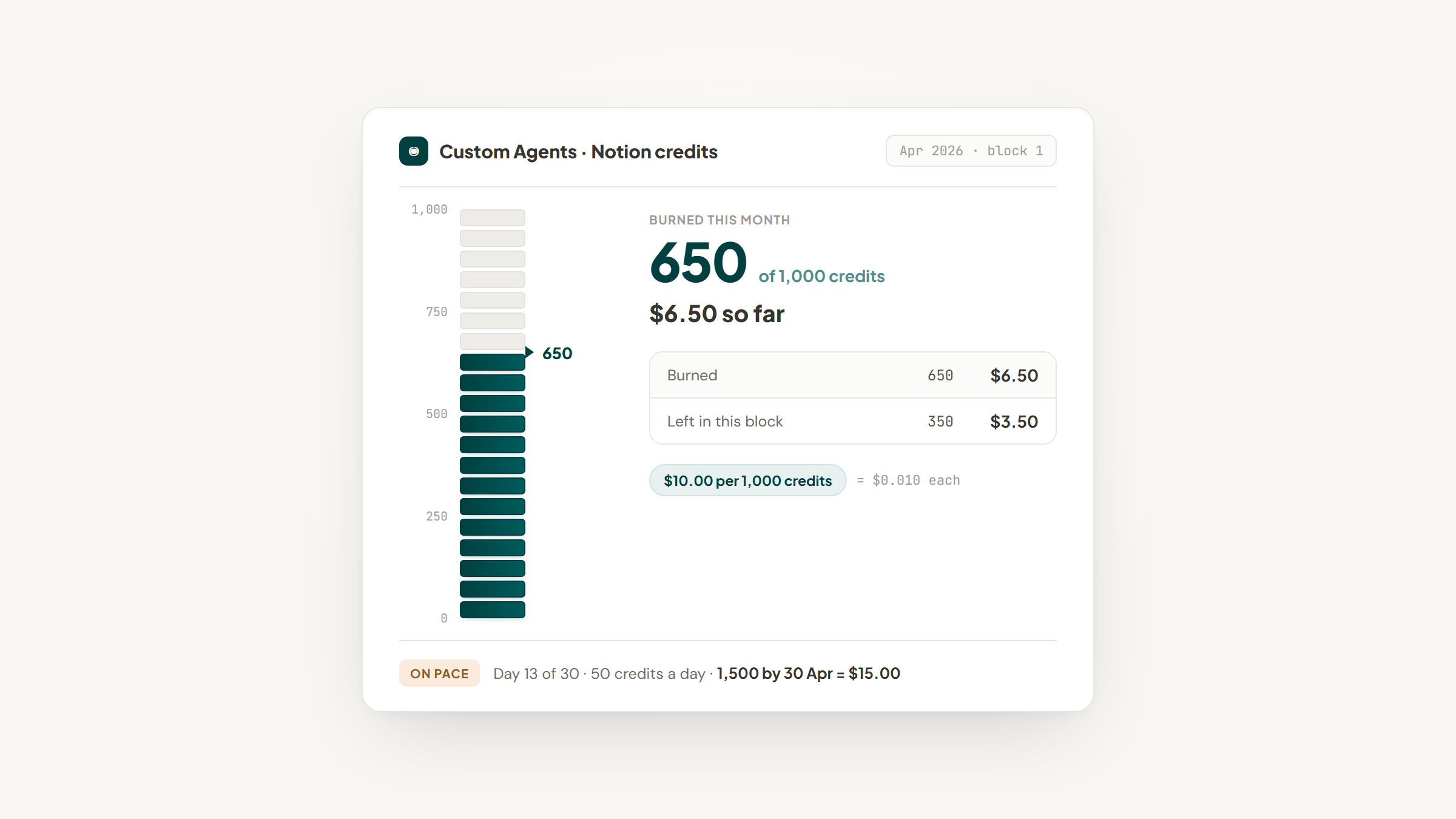
Custom Agents go further, running on a schedule or a trigger and completing multi-step work without you present. Notion's pricing page lists them as free to try, then $10 per 1,000 monthly credits, and its AI page describes them as free to use on Business and Enterprise plans including Business trials.
Because a run consumes credits based on how much work it does, cost is genuinely hard to predict before you have run a few. If you plan to lean on them, watch the credits dashboard for a fortnight before assuming a number. For repeatable, rule-based work, the older and free option is often better value, and our Notion automations guide covers what those can do without touching credits.
AI Meeting Notes
This is the strongest feature in the package and the easiest to justify on its own.
Meeting Notes transcribes a conversation, summarizes it, and leaves the result as a Notion page in the workspace where the rest of the project already lives. The value is not the transcription, which many tools do well, but that the output lands where you will look for it later.
For anyone whose work runs on calls, this alone can carry the Business upgrade. A standalone transcription tool is one more subscription, and one that still leaves you filing the output by hand.
The caveat is retention. Transcripts and AI data are held for 30 days on every plan except Enterprise, which gets zero data retention with the model providers. For most teams that is fine; for regulated ones it is the deciding detail.
Enterprise Search and Connectors
Enterprise Search is the feature that justifies the "AI workspace" framing, searching across Notion and connected tools like Slack, Google Drive, Microsoft Teams, Jira, GitHub and Gmail in a single query.
That breadth is genuinely useful, and the caveat is the same one running through this review: the connectors require Business or Enterprise. Several published articles suggest Plus is enough, and it is not.
The exceptions are the Notion Mail and Notion Calendar connectors, which are free on every plan. If your search problem is mostly email, that gap may be smaller than it looks, and our Notion Gmail integration guide covers what is possible without the upgrade.
Where Notion AI Struggles
Every Notion AI review should carry this section, and most do not.
The most important weakness for anyone tracking leads is how it handles structured data. Notion AI is strongest on prose and weakest when the answer requires reasoning across many database properties, which is precisely where CRM information lives. A user in that same r/Notion thread complained that it appeared to pull from page body text rather than database properties, which matched their experience of asking questions about records and getting weak answers.
That is an anecdotal report rather than a documented limitation, and Notion has continued shipping database-aware features since. It is worth testing on your own data before you plan around it, because if your pipeline lives in properties, this is the difference between the AI being useful and being decorative.
Two other limits are worth naming. The fair-use throttling means heavy days can quietly degrade, and the all-or-nothing packaging means a five-person team pays five Business seats even if one person uses the AI.
That packaging is not unusual, and it is not the worst deal available either. Bundling AI into the seat price rather than selling it as an add-on works out competitively once you total both lines, which is the comparison we ran in Notion vs ClickUp.
Privacy and Data Handling
Notion's position here is clearer than most, and it is one of the better reasons to prefer an in-workspace AI over pasting company information into a public chatbot.
Notion states it will not use your data to train its models unless you opt in, and it has contractual agreements with its AI subprocessors prohibiting them from training on customer data. Data is encrypted in transit.
Retention is where the plans diverge. Enterprise gets zero data retention with the model providers and support for HIPAA compliance; every other plan carries 30-day retention. If you handle protected health information, Enterprise is not a preference, it is the requirement.
Does AI at Work Actually Save Time?
Any review that tells you a tool "saves hours" without evidence is guessing, so it is worth looking at what the research says about AI assistance at work generally.
The strongest evidence is a study by Brynjolfsson, Li and Raymond, published in the Quarterly Journal of Economics in 2025, covering 5,172 customer support agents. Access to an AI assistant raised productivity by 15% on average.
The average hides the useful part. Less experienced and lower-skilled workers improved on both speed and quality, while the most experienced and highest-skilled workers saw small speed gains and small declines in quality. If you already know your job well, the gain is smaller than the marketing suggests.
There is a sharper warning about self-assessment. In a 2025 randomized trial by METR, 16 experienced developers working on repositories they knew well were 19% slower when allowed to use AI tools, having predicted a 24% speedup beforehand and still believing afterwards that they had been about 20% faster. METR now labels that result historical and has changed its study design, so it is not a verdict on today's tools.
The transferable lesson is not about coding. It is that your sense of whether AI saved you time is unreliable evidence, and in that trial it was wrong by nearly 40 percentage points in the flattering direction. Time a real task with and without it before you decide.
Notion AI for Lead Management, Specifically
For anyone running a pipeline in Notion, the value splits cleanly and it is worth being blunt about which half is which.
What it does well: summarizing a long thread of notes on an account, drafting follow-up messages in context, and pulling meeting notes into the right record without filing. Autofill can populate properties from page content, which genuinely reduces typing.
What it does not do is get the lead into the database in the first place. No amount of AI helps with the part where you are looking at someone's site, switching tabs, and typing their name, company, URL and source into a form. That gap is what we built Lead to Notion to close.
The extension is free, opens beside whatever page you are reading, and writes the lead into your existing Notion database in about ten seconds, with the deal value, source and stage already set. Before saving, it checks the website and LinkedIn URL against your database and warns you if the record already exists.
Two things are worth saying plainly. Your Notion token is stored locally on your own device and is only ever sent to Notion's API, because there are no servers in the middle. And installing it means unpacking a downloaded ZIP yourself, since no Web Store listing exists yet, with several fields required rather than optional.
Every lead arrives at the Lead stage and moves onward from there. The extension is a capture layer rather than a CRM, so Notion keeps doing the tracking.
The honest summary of the two together: Notion AI helps you think about leads you already have, and it costs $20 a seat. Getting them in there costs nothing.
Is Notion AI Worth It for Your Team?
Whether Notion AI is worth it depends far more on how you work than on how good the AI is.
If this is you | Verdict | Reasoning |
|---|---|---|
Your day is meetings | Buy it | Meeting Notes alone can justify the seat |
You already pay for ChatGPT or Claude | Probably not | You are paying twice for overlapping capability |
You are on Plus with a small team | Do the math first | Every seat moves to $20, not just yours |
Your work lives across Slack, Drive and Notion | Buy it | Enterprise Search is the strongest reason on this list |
You mostly query database properties | Test it first | This is its weakest area, and it is where CRM data sits |
You are a solo user on Free | Not yet | The trial will tell you more than any review |
You handle regulated data | Enterprise only | Zero retention and HIPAA support stop at that tier |
The pattern is that Notion AI rewards people whose information is scattered and punishes people who already have a good system. If you are choosing tools for a young company where nothing is settled yet, our Notion for startups guide covers what to put in place before adding AI on top.
Notion AI Review: The Verdict
Notion AI is a good product priced as a platform upgrade, and that pricing is the whole review. At $20 per member per month it is not competing with a $20 ChatGPT subscription, it is competing with your entire workspace bill going up for everyone.
If your work is meetings, scattered documents and search across tools, it earns that. If your work is structured records in databases, test it on your own data first, because that is where it is weakest and where the marketing is least specific.
For lead work in particular, the AI is the second problem. The first is getting leads into the database at all, and the setup guide explains that connection step from end to end.
That part is free to fix. Download the extension and aim it at your leads database.
Frequently asked questions
It is worth it if your day is meetings and scattered documents, and hard to justify if you already pay for a general assistant. On cost, it is not sold separately. Notion AI comes with the Business plan at $20 per member per month billed yearly, and Free and Plus receive a trial only. Custom Agents are billed on top, listed as free to try and then $10 per 1,000 monthly Notion credits. Because every member of a workspace occupies a seat, the real cost is $20 times your headcount.
Turn Notion into your CRM
Lead to Notion is a free Chrome extension. Save leads to your Notion database in one click, add notes, and track your pipeline. No account, no server.