
Notion vs Obsidian in 2026: Which Tool Fits Your Workflow?
Notion vs Obsidian compared on price, databases, privacy, speed and collaboration. Real 2026 pricing, honest verdicts, and which one fits your work.
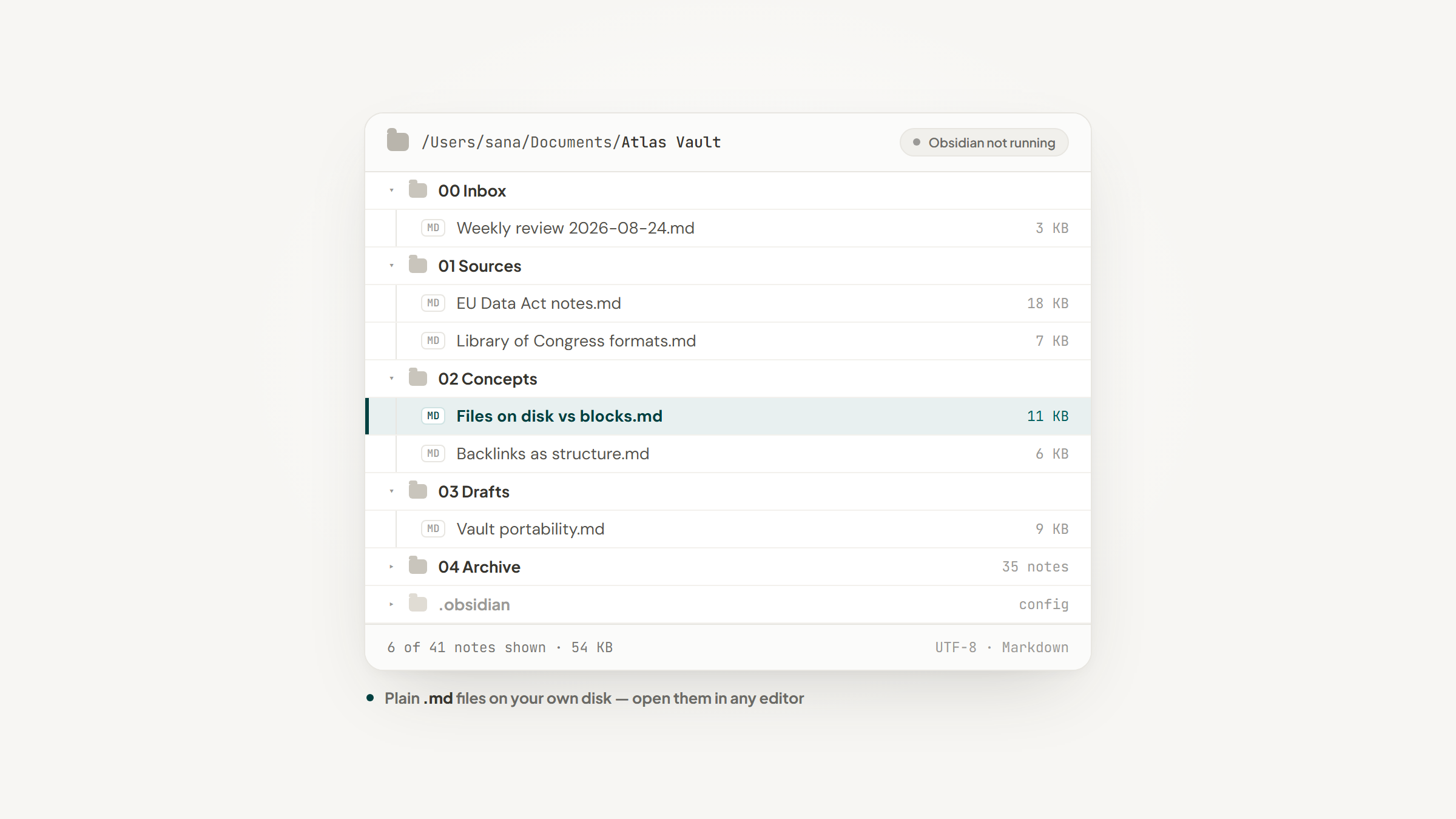
Choosing between Notion and Obsidian feels like choosing between two note-taking apps. It isn't. The two tools disagree about something more basic: where your writing should live and who should be able to reach it.
Notion keeps your work in a hosted database and hands you a browser window onto it. Obsidian keeps your work as ordinary text files in a folder on your machine and gives you an editor that reads them. Almost every difference people argue about downstream, speed, privacy, plugins, pricing, collaboration, falls out of that one decision.
Most Notion vs Obsidian comparisons open with feature lists. This one opens with that decision, because the feature lists are downstream of it. Search results split about evenly between Notion vs Obsidian and Obsidian vs Notion, and the ordering tells you nothing: both describe the same choice.
We build a free Chrome extension that saves leads into Notion databases, so we spend our working days inside one of these two tools. That is worth saying up front, because it would be easy to write a comparison where Notion happens to win everything. This isn't that. Obsidian is genuinely better than Notion at several things, and if those things are what you need, you should use Obsidian.
Here is what actually separates them in 2026, what each one costs, and how to tell which side of the line you fall on.
What Notion Is Built For

Notion's homepage, notion.com (August 2026).
Notion is a workspace where every page can also be a database row. You write a doc, then decide it should have a status, an owner and a due date, and the doc becomes a record in a table without moving anywhere.
That flexibility is the product. A Notion page can hold text, a table, a kanban board, a calendar, an embedded Figma file and a linked view of another database, and any of those can be filtered differently for different readers.
The tradeoff is that everything is a block in a hosted system. You reach your writing through Notion's app or Notion's website, and the structure that makes databases work is Notion's structure, not a folder tree you arranged yourself.
Teams accept that trade because the structure is shareable. A workspace a colleague can navigate is worth more than one only you understand, which is the same reason Notion holds up against a dedicated work platform in our Notion vs Monday comparison.
What Obsidian Is Built For

Obsidian's homepage, obsidian.md (August 2026).
Obsidian is an editor pointed at a folder of Markdown files, which it calls a vault. Every note is a `.md` file you could open in TextEdit, Notepad or any other editor, and the folder is on your disk whether Obsidian is running or not.
Because the files are local and plain, the app is fast in a way browser-based tools rarely are. Search returns instantly, switching notes has no loading state, and nothing waits on a network round trip.
Obsidian's own pricing page states the position bluntly: "Free without limits. No sign-up required. No strings attached." There is no account, no seat count and no feature gate on the app itself.
One correction from the Obsidian community is worth making early, because it changes how you read every comparison. Obsidian is not a free tier of a paid product. The app is the whole product, and the two paid services are bolted onto the side.
The Real Difference: Files on Disk vs Blocks in a Database
Strip away the feature lists and the whole Notion vs Obsidian question reduces to one distinction. Obsidian is file-based. Notion is block-based.
In Obsidian, a note is a file. Move it, rename it, back it up with the same tools you back up photos with, open it in a different app in ten years. In Notion, a note is a collection of blocks in a database, and a block is only meaningful inside Notion's model of the world.
That model buys Notion real capability. Blocks can be queried, rolled up, filtered and displayed six ways at once, which is why Notion can act as a project tracker and a CRM while Obsidian cannot. It also means your writing is only as reachable as Notion's export.
Blocks are still looser than true relational records, a distinction we work through in Airtable vs Notion. Obsidian sits further out again, with no enforced structure at all.
The practical test is simple. Ask what happens to your notes if the company behind the tool disappears tomorrow. With Obsidian, nothing happens, because the files were never anywhere else. With Notion, you need an export, and you need it to be a good one.
Pricing Compared
Neither tool is expensive, but they charge for completely different things, which is why Obsidian vs Notion pricing is so often compared badly. The headline numbers do not line up.

Notion's pricing page, notion.com (August 2026).

Obsidian's pricing page, obsidian.md (August 2026).
Notion charges per member per month. Obsidian charges nothing for the app and sells sync and publishing separately, so a solo user with one device pays zero forever.
Notion | Obsidian | |
|---|---|---|
App itself | Free $0 per member/month | Free, no limits, no sign-up |
Next tier up | Plus $10 per member/month | Sync $4 per user/month |
Tier above that | Business $20 per member/month | Publish $8 per site/month |
Top tier | Enterprise, custom pricing | No higher tier exists |
Billing note | Yearly saves up to 20% | Both add-ons priced billed annually |
Commercial use | Same paid plans | No license required, only encouraged |
Discounts | Plus is free for students and educators | 40% off Sync and Publish for education and nonprofits |
Two details in that table do more work than the prices. Obsidian does not require a commercial license, so a consultant billing clients out of a vault owes nothing; the license exists to fund development and is explicitly optional. And Notion's free plan is genuinely usable alone but gets tight with a team, where block limits, 5MB uploads and seven-day page history start to bite.
The AI question also lands differently than most reviews suggest. Notion's Free and Plus plans list only a "Trial of Notion AI," and the real features, Notion Agent, AI Meeting Notes and Enterprise Search, appear on Business at $20. If AI is the reason you are considering Notion, the price is $20 per member per month, not $10.
Where Your Notes Actually Live
Obsidian stores your vault locally and states that your data is "inaccessible to us," collects no telemetry and is never sold. Turn on Sync and files are encrypted end to end with AES-256, so the sync service moves data it cannot read.
Notion stores your workspace on Notion's infrastructure. That is the deal you make for multiplayer editing, permissions and search across a company, and for most teams it is a fine deal.
The question is no longer purely philosophical either. The EU Data Act, in force since January 2024 and fully applicable since September 2025, obliges providers of data processing services, software as a service included, to let customers switch away.
The same rules ban switching fees outright from 12 January 2027. That is EU law, so a US reader benefits only where a vendor applies the practice everywhere, but it turns a vague preference for portability into a dated obligation you can check.
The archival view points the same direction without overstating it. The Library of Congress, setting out which formats it prefers for long-term preservation of datasets, says platform-independent, character-based formats are preferred over native or binary ones, and puts UTF-8 first among character encodings. A folder of UTF-8 Markdown files is about as close to that description as a note-taking format gets.
Databases, Tables, and Structure
This is where the gap is widest, and it is not close.
Notion databases are the reason people stay. A table can be viewed as a board, a calendar, a gallery or a timeline; properties can be formulas, relations to other databases or rollups that summarize them; and filters let two people look at the same data and see only their own slice.
Obsidian's answer is different in kind. Notes carry YAML frontmatter, and community plugins can query that frontmatter to assemble list and table views. It works, and people build genuinely sophisticated systems this way, but you are assembling a query layer rather than switching a view.
If your work is fundamentally records, clients, deals, applications, inventory, content calendars, Notion is the correct tool and the argument ends there. We walk through what that looks like in practice for early teams in our guide for startups.
Linking, Backlinks, and the Graph
Both tools link notes with `[[double brackets]]`, and both show backlinks. The difference is what the linking is for.
Obsidian treats links as the primary structure. The graph view draws your vault as a network, unlinked mentions surface connections you didn't make deliberately, and the whole design assumes you will find ideas by wandering between them.
Notion treats links as navigation between pages that are already organized by hierarchy and database. You can link freely, but the tool nudges you toward putting a page in the right database rather than trusting the web of links to hold it.
Neither approach is better in the abstract. It depends whether you are trying to remember what you thought, or trying to find a specific record fast.
Plugins and Extensibility
Obsidian's plugin ecosystem is its second-biggest advantage after file ownership. A user on the official Obsidian forum put the count at almost 2,700 community plugins, and the practical effect is that most workflow gaps have a community answer.
The catch is real and worth stating. Plugins are third-party code running against your notes, they break when the app updates, and a vault held together by fifteen of them becomes its own maintenance project. Experienced users in that same forum thread recommend starting with almost none.
Notion's extensibility runs through integrations and its API rather than local plugins. Nothing third-party executes inside your workspace, which is a security posture some organizations require and a ceiling others resent. If you want to push Notion further without code, native automations are the first place to look, and we mapped out what they can and cannot do in our Notion automations guide.
Speed, Offline Access, and Mobile
Obsidian is the faster tool, and the gap is most obvious on mobile and on large vaults. Files are local, so there is no round trip.
Offline is a clean win for Obsidian too. The app never assumed a network in the first place, so losing one changes nothing about how it behaves.
Notion has improved but is still doing something harder. Mobile lag comes up repeatedly in the Obsidian community as a reason people gave for switching, including in the thread we drew on for this piece.
Against that, Notion syncs across devices with no configuration and no add-on. Obsidian's equivalent costs $4 per user per month, or free effort if you route the vault through iCloud, Dropbox or Git yourself, which works and occasionally produces conflicted copies.
Collaboration and Sharing
Notion wins this outright, and it isn't a close call. Real-time multiplayer editing, comments, granular permissions, guests, shared teamspaces and public pages are all built in.
Obsidian is a single-player tool with collaboration bolted on. Sync supports shared vaults, and Publish puts a vault on the web as a site for $8 per site per month, but there is no comment thread and no permission model for a colleague who should see three notes and nothing else.
If someone else needs to edit, review, or even reliably find your work, choose Notion. Everything else in this comparison is a preference; this one is closer to a requirement.
Where Notion starts to strain is heavy task assignment across a large team, the ground we cover in Notion vs ClickUp. Obsidian never enters that conversation.
Which One Can Actually Track Leads
This is the section where the two tools stop being comparable, and it matters more than it sounds, because "use it as a CRM" is one of the most common things people ask both tools to do.
Notion can genuinely run a pipeline. A database with a Status property, a deal value, a source and a last-contacted date is a working CRM, and thousands of small teams operate exactly that way. Obsidian cannot do this in any honest sense. You can approximate it with frontmatter and a query plugin, but you are rebuilding a database engine in a note-taking app.
The catch with a Notion CRM is not the database. It is the typing. Every lead means switching tabs, copying a name, copying a URL, picking a source, setting a value, and doing it again for the next one, which is where the pipeline quietly rots.
That is the specific problem we built Lead to Notion to solve. A free Chrome extension puts a small panel beside whatever you're reading; fill one short form, hit save, and the lead arrives in your Notion database with notes, deal value and pipeline stage already filled in. Most leads take about ten seconds.
Two parts of it matter more than the speed. It reads your database and matches your real column names, so it adapts to the CRM you already built rather than making you rebuild it. And before saving, it checks the database for the same website or LinkedIn URL and warns you, naming the card that already exists, which is how a shared pipeline avoids collecting the same person three times.
The limits are worth stating plainly, because they are real. There is no Chrome Web Store listing yet, so you download a ZIP, unzip it, and load the folder with Developer mode switched on. Several fields are genuinely required rather than optional. And every lead saves into the "Lead" stage, so you move it along afterwards from the note tab.
None of that makes it a CRM. It is a capture layer for a Notion database, and Notion remains the thing doing the actual work.
Notion vs Obsidian: Which Should You Pick?
Match the tool to the job rather than to the review score, and the choice usually makes itself.
If your main job is | Pick | Why |
|---|---|---|
Thinking, writing, research notes | Obsidian | Fast, local, link-first, nothing between you and the text |
Tracking records, deals or projects | Notion | Real databases with views, filters and relations |
Working with other people | Notion | Permissions, comments and multiplayer editing are built in |
Keeping notes private and portable | Obsidian | Plain files on your disk, no account, no telemetry |
Running a lightweight CRM | Notion | Obsidian has no honest equivalent |
Working offline or on weak connections | Obsidian | Designed for it rather than adapted to it |
Spending nothing, ever | Obsidian | The app is free with no limits and no sign-up |
Every Obsidian vs Notion comparison eventually reaches this fork, and the most useful answer we found came from someone in the r/ObsidianMD community who refused to pick. Working in academia, they use Obsidian for reading notes on books and articles, because collating ideas and spotting connections is what that tool does well.
Notion stays in their setup for habit tracking and project work, where databases and buttons handle the job better. That is one person's anecdote from a Reddit thread rather than a study, but it describes what a lot of people end up doing.
Running both costs nothing extra, since Obsidian is free and Notion has a free plan. The split that works is thinking in one and tracking in the other.
Picking a Side Without Regretting It
The Notion vs Obsidian question is not which tool is better. It is whether your work is mostly prose or mostly records.
If it is prose, Obsidian will feel like a relief, and it will keep feeling that way in ten years because the files are yours. If it is records, and especially if anyone else touches them, Notion is the only one of the two that can do the job at all.
Wiring our extension to a Notion database takes a few minutes, and the setup guide walks through creating the integration, granting it access, and matching your own field names.
If your records happen to be leads, and you are tired of copying them across by hand, download the extension, connect your database, and get the next one saved in about ten seconds.
Frequently asked questions
The app is genuinely free with no limits and no sign-up, and that includes commercial use. Obsidian's pricing FAQ says you are not required to buy a commercial license, only encouraged to. The paid pieces are two optional services, Sync at $4 per user per month and Publish at $8 per site per month, both priced billed annually. Everything the editor does is free whether you buy those or not.
Turn Notion into your CRM
Lead to Notion is a free Chrome extension. Save leads to your Notion database in one click, add notes, and track your pipeline. No account, no server.