
10 Best Personal CRM Software in 2026 for Tracking People
The 10 best personal CRM tools in 2026, with prices read off each vendor's own page, honest limitations, and which one fits how your network grows.
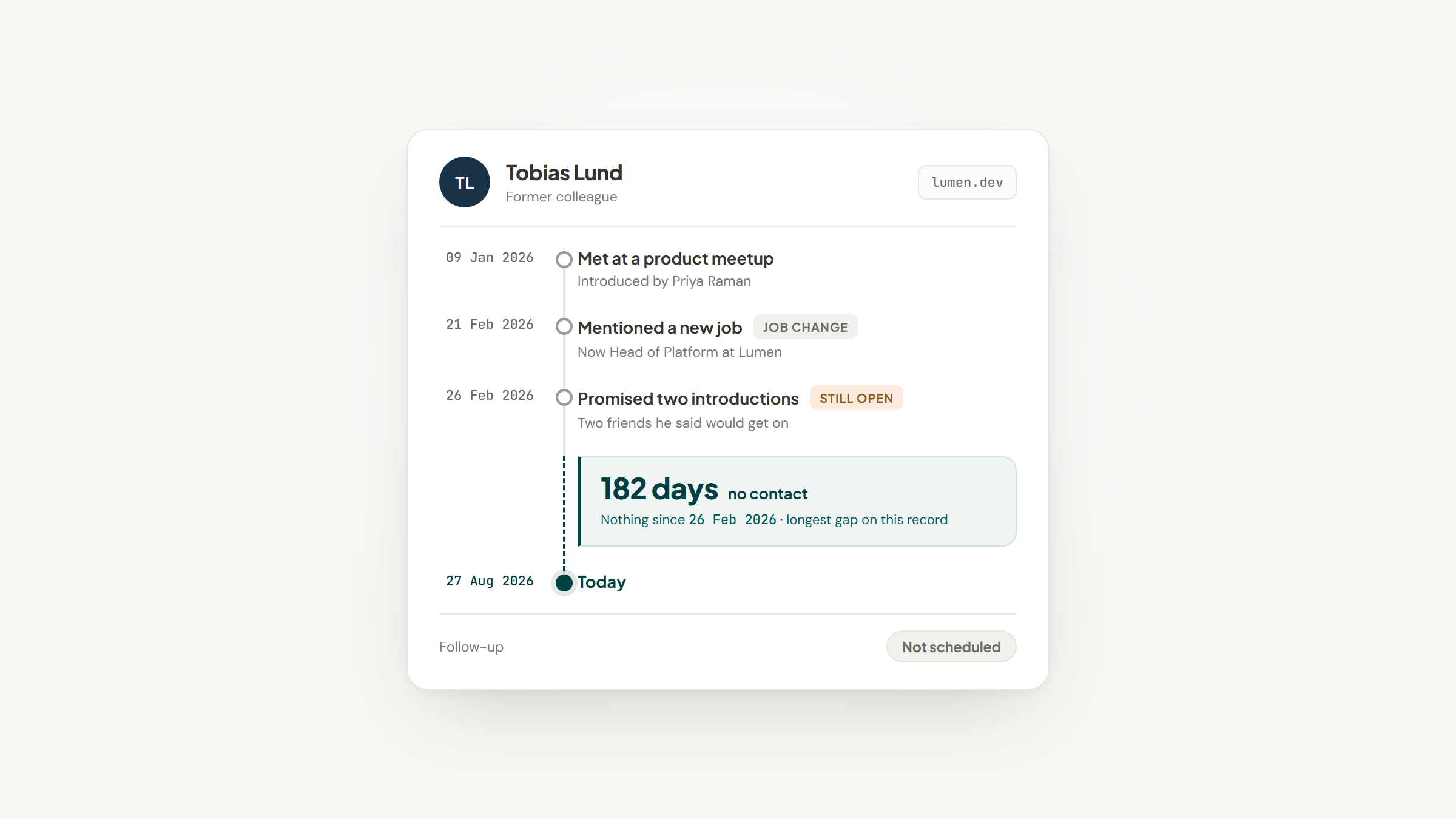
Most people looking for a CRM for personal use do not actually need a CRM. They need to stop forgetting that a former colleague mentioned a new job six months ago, and that they promised to introduce two friends who would get on.
That is what a personal CRM is for. It is an address book that remembers context and nags you at the right moment, and it is a genuinely different product from the sales CRMs that dominate search results for the term.
We build Lead to Notion, a free tool in this space, so treat our own entry with the skepticism it deserves and read the other nine on their merits. Several of them are better than ours at things we do not do at all.
Every price below was read off the vendor's own pricing page in August 2026, and every tool was opened and looked at. That matters more than usual here, because this category churns hard and two widely-recommended names turned out to be wrong.
What a Personal CRM Actually Does
A sales CRM organizes around a deal. This kind organizes around a person, and the questions it answers are different: when did we last speak, what did they tell me, and who should I contact this week.
The research explains why the category exists at all. Work on the structure of human social networks, published in the journal Social Networks, describes personal networks as nested layers of roughly 5, 15, 50 and 150 people, widening to about 500 acquaintances and 1,500 faces you can put a name to, with contact frequency dropping at each layer.
Memory handles the inner layers without help. It fails at the outer ones, and those are exactly the people who send work your way.
Reminders are the mechanism that covers the gap, whether they come from a dedicated tool or from Notion automations firing on a date field you maintain yourself.
The timing is unhelpful too. The Bureau of Labor Statistics found that in 2025 only 30% of Americans socialized or communicated on an average day, down from 38% a decade earlier, with the time spent falling from 41 minutes to 35. Staying in touch is getting rarer, which makes a system worth more than it used to be.
The Best Personal CRM Software in 2026
The table below is the short version. Pricing is the entry paid tier unless the tool has a genuine free plan, and ratings reflect how well each tool does the personal-CRM job specifically, not how big the company is.
Tool | Best for | Key features | Main limitation | Pricing (from) | Rating |
|---|---|---|---|---|---|
Notion + Lead to Notion | Contacts inside your own workspace | Custom database, one-click capture, duplicate check | You build the structure yourself | $0 (free) | ★★★★★ |
Dex | Keeping a LinkedIn network warm | LinkedIn sync, keep-in-touch nudges, birthdays | Connection sync capped by tier | $12/month | ★★★★☆ |
Mesh (formerly Clay) | Automatic context on everyone | Auto-enriched profiles, job-change alerts, search | Free tier wants a card | $10/month | ★★★★☆ |
Monica | Privacy and self-hosting | Relationships, reminders, journal, gifts, debts | No integrations to speak of | $0 self-hosted | ★★★★☆ |
Covve | People you meet at events | Card and badge scanning, auto-sync, reminders | Scanner-led, weaker as a daily CRM | $12/seat/month | ★★★☆☆ |
folk | Small teams sharing contacts | Shared pipelines, AI assistants, enrichment | Priced per member, aimed at teams | $24/member/month | ★★★★☆ |
Cloze | Automatic history with no filing | Silent email and calendar capture, follow-up nudges | Now marketed mainly at real estate | $17/month | ★★★☆☆ |
Nat | Consultants who live in Gmail | Inbox-based follow-ups, notes inside Gmail | Annual billing only, no monthly plan | $370/year | ★★★☆☆ |
LeadDelta | Working a LinkedIn network as a team | Connection management, shared inbox, warm intros | LinkedIn-centric by design | $17.50/user/month | ★★★★☆ |
Airtable | People who want to design the schema | Flexible fields, views, relations, automations | No capture layer, no reminders engine | $0 (free) | ★★★☆☆ |
Two things to read out of that table before the reviews. The spread on price is enormous for a category where the tools do broadly similar things, and the cheapest options are not the weakest.
Notion + Lead to Notion

Best for: Contacts inside your existing workspace
Overview: If your notes, projects and reading list already live in Notion, you do not need another app to hold your contacts. A Notion database with the right columns is a working personal CRM, and it costs nothing on the free plan.
What stops most people is data entry rather than the database itself. Every new person means switching tabs, copying a name and a link, choosing a category and doing it again tomorrow, which is how a contact list quietly dies.
We built Lead to Notion to remove that step. Ours is free, and it docks a compact form next to the profile in front of you, so a single save writes that person into the Notion database you already built, notes and stage included.
The part that matters for a personal CRM is the duplicate check. Before saving, it looks for the same website or LinkedIn URL in your database and warns you, naming the record that already exists.
Key features:
- A side panel that saves a person from any page in about ten seconds, so capture happens while you are still on their profile
- A duplicate guard that checks the website and LinkedIn URL before saving and names the existing record
- Column mapping that reads your real database and matches your own field names, so you keep the structure you designed
- A running note log where every entry is stamped with the date, so a record reads as a history
- Draft auto-save, so a half-typed record survives a closed tab
- A pipeline view that totals value by stage, useful if some of your contacts are also prospects
Pricing: Free forever, $0, with no account, no trial and no card. Notion itself is free for individual use, so the whole setup can cost nothing. Notion's paid plans start at $10 per member per month if you outgrow the free tier.
Pros: genuinely free, no account required, your data stays in a database you own, adapts to your existing columns, token stored locally on your device
Cons: you install it by hand, downloading a ZIP and loading the unpacked folder, and several fields are required rather than optional
How to start using it:
- Download the ZIP from the releases page and unzip it, keeping the folder.
- Open `chrome://extensions`, turn on Developer mode, and choose Load unpacked.
- Create an integration at notion.so/my-integrations and copy the internal secret.
- Open your contacts database in Notion, then use Connections to connect that integration.
- Paste the token and database ID into the extension settings, test the connection, and map your columns.
Why it works for tracking people: the record lives in a database you already own, in a workspace you already open every day, so nothing new has to earn a place in your routine. And because it is a Notion database, you can shape it around how you actually think about people.
Final verdict: the honest framing is that this is a capture layer, not a CRM. Notion is the CRM, and we are the thing that stops you copy-pasting into it. If you are already a Notion user, it is the cheapest working option here by a wide margin; if you are not, one of the purpose-built tools below will suit you better.
Try it: download the extension and connect a database.
Dex

Overview: Dex describes itself as a digital rolodex, pulling contacts together from LinkedIn, email, calendar and messaging apps into one list, then reminding you who you are losing touch with.
Key features:
- LinkedIn sync that pulls connections in and flags job changes, so your list updates without maintenance
- Keep-in-touch reminders and birthday alerts, which is the core loop of the product
- Notes and custom fields per person, so context survives longer than your memory of the conversation
Pricing: Premium is $12 a month and Professional is $20 a month, both at the annual rate, with monthly and quarterly options costing more. Every plan starts with a seven-day trial and no card is required to begin.
Pros: wide integration coverage, clean keep-in-touch loop, student and nonprofit discounts
Cons: LinkedIn sync is capped at 2,500 connections on Premium and 9,000 on Professional, there is no free tier, and the reminder cadence takes tuning
Where it fits: Dex is the strongest option if the network you care about is essentially your LinkedIn connections and you want it maintained for you rather than curated by hand.
Final verdict: the most polished general-purpose personal CRM here, provided the connection caps clear your network size.
Mesh (formerly Clay)

Overview: Mesh is the tool most people still call Clay. It imports everyone you have ever emailed, met or connected with, then enriches each record automatically so profiles stay current without you touching them.
Key features:
- Automatic life updates covering job changes, moves and news mentions, which is the feature people actually stay for
- Import from email, calendar, LinkedIn, Facebook, iMessage and more, so the initial list builds itself
- Reconnect prompts, reminders and birthday notifications built around search and groups
Pricing: the Personal tier is free but asks for a credit card and caps you at 1,000 contacts. Pro is $10 a month and lifts that cap, and Team is $40 per seat per month.
Pros: best-in-class automatic enrichment, strong search, generous free tier if you stay under the cap
Cons: the free plan requiring a card puts people off, enrichment occasionally surfaces stale or wrong details, and the rebrand makes older reviews confusing to follow
Why buyers shortlist it: almost no effort is required after setup, which is the opposite of most tools in this list and the main reason it keeps getting recommended.
Final verdict: the least manual option here, and worth the $10 if automatic context is the thing you want.
Monica

Overview: Monica is the open-source entry, and it is unusually clear about being for friends and family rather than customers. Its own line is that it is a CRM where nobody is a lead.
Key features:
- Relationship mapping between people, so partners, families and colleagues connect properly
- Reminders, journal entries and records of gifts, debts and promises, which no sales tool bothers with
- Full data export and self-hosting, so you can leave whenever you want
Pricing: self-hosting costs nothing beyond your own server. The hosted version is $90 a year with a 30-day trial and no card required, and it does not charge per contact.
Pros: genuinely open source, no ads or data resale, unlimited contacts and reminders, cheapest hosted option here
Cons: almost no integrations, so records are entered by hand; the interface is plain; and a from-scratch version 3 is due before the end of 2026, which is worth knowing before you invest time
Its real strength: privacy. Your data sits on infrastructure you choose, and the project has been open source since 2017 with more than 24,000 GitHub stars behind it.
Final verdict: the right answer for personal relationships you want tracked privately, and the wrong one if you need automatic capture.
Covve

Overview: Covve is built around scanning. Business cards, event badges and digital profiles go in through the camera and come out as structured contacts that sync onward, which makes it a conference tool first.
Key features:
- Card and badge scanning as the primary input method rather than an add-on
- Auto-sync of captured contacts into your CRM, so scanning is not a dead end
- Reminders and notes to keep the people you met from going cold
Pricing: the Covve App plan is $12 per seat per month, or $119 a year. Adding the web-based Portal takes it to $20 per seat per month, or $199 a year, and a free trial runs first.
Pros: best-in-class scanning accuracy, useful if you attend events regularly, straightforward pricing
Cons: weaker than the others as a day-to-day relationship tool, the scanning focus means less depth elsewhere, and the free trial ends with scanning disabled
Why it made this list: if your network grows mostly in rooms full of people handing you cards, no other tool here handles that first mile as well.
Final verdict: buy it for the scanner, not for the CRM.
folk

Overview: folk sits on the boundary between a personal CRM and a light team CRM. It captures the context around a relationship and uses AI assistants to fill in the busywork, and it assumes more than one person will be looking.
Key features:
- Shared pipelines and contact groups, so a small team works one relationship list
- AI assistants that enrich records and handle repetitive updates
- Integrations that pull context from email and LinkedIn into a single view
Pricing: Standard is $24 per member per month, Premium is $48 and Enterprise starts at $80, all billed monthly. Paying annually brings those to $288, $576 and $960 per member per year.
Pros: genuinely pleasant interface, strong for shared networks, good enrichment
Cons: priced per member, which is expensive for one person; aimed at teams rather than individuals; and the feature set overshoots a purely personal use case
Where it beats the alternatives: two or three people who need to see the same relationships without buying a sales CRM.
Final verdict: excellent tool, but you are paying team prices for a personal problem.
Cloze

Overview: Cloze quietly watches your email, calendar and calls, then assembles a history for each person without you filing anything. Worth knowing before you sign up: its homepage now leads with AI-powered real estate, though the general plans are still sold.
Key features:
- Automatic capture of email, meetings and calls into a per-person timeline
- Follow-up prompts based on who is going quiet rather than on a schedule you set
- A unified contact view that merges duplicates across sources
Pricing: Cloze Pro is $17 a month billed annually, or $19.99 month to month. Business Silver is $21 per user per month and Gold is $29, with a Platinum tier above that.
Pros: almost zero manual entry, genuinely useful timeline, strong email integration
Cons: the real-estate repositioning means marketing and some features point away from general use, the interface is dense, and the tiering is complicated for one person
What it is genuinely good at: remembering conversations you never wrote down, which is the single hardest part of keeping a network warm.
Final verdict: strong engine, muddled positioning; try the Pro tier before committing.
Nat

Overview: Nat is aimed squarely at consultants and freelancers whose relationships live in Gmail. It scans the inbox for conversations that need a follow-up and lets you take notes without leaving your email.
Key features:
- Follow-up detection from your inbox, with one-click sending and editable templates
- Note-taking inside Gmail, plus an email before each meeting so you can prepare
- Automatic categorization that flags relationships going cold
Pricing: one plan, called Magic, at $370 a year. There is a ten-day free trial and refunds are pro-rated rather than full, and there is no monthly option at all.
Pros: genuinely useful if Gmail is where your relationships happen, simple single plan, founder-level support
Cons: the most expensive option here by some distance, annual billing only, and it explicitly does not sync WhatsApp or SMS
Why it earns a place here: the inbox-first design means it works with a habit you already have instead of asking for a new one.
Final verdict: a narrow tool that suits consultants well and almost nobody else at that price.
LeadDelta

Overview: LeadDelta treats your LinkedIn connections as a database you can actually work with: filter them, tag them, message them from one inbox, and surface warm introductions across a team's combined network.
Key features:
- Connection management with tags, filters and notes, which LinkedIn itself does badly
- A shared inbox so conversations do not get stranded in one person's account
- Warm-intro surfacing across the combined connections of everyone on the team
Pricing: Starter is $17.50 per user per month, Pro is $38.50 and Business is $69.30, all at the yearly rate with a 30% discount applied. A seven-day trial runs without a card.
Pros: makes a large LinkedIn network genuinely searchable, useful team features, no bots involved
Cons: it only really understands LinkedIn, the per-user pricing adds up, and it is more sales-adjacent than the others here
Its main appeal: turning a network you already built into something you can query, rather than scrolling a connections list.
Final verdict: the best pick if LinkedIn is your network and you want it organized rather than replaced.
Airtable

Overview: Airtable is a database rather than a CRM, which is exactly why some people prefer it. You design the fields, views and relations yourself and end up with something shaped precisely around how you think about people.
Key features:
- Strongly typed fields and linked records, so the structure is enforced rather than suggested
- Multiple views of the same contacts, including calendar and kanban layouts
- Automations that trigger reminders or updates when a field changes
Pricing: the free plan covers a single personal contact base comfortably. Paid plans add automation runs, richer field types and collaboration when you outgrow it.
Pros: total control over structure, genuinely strong relational model, useful free tier
Cons: no capture layer, so every contact is typed in by hand; no built-in reminder engine; and you are building a CRM rather than using one
Where it fits: people who enjoy designing a system and want it to behave exactly as specified. We compare the two database options directly in Airtable vs Notion.
Final verdict: the most flexible option and the most work, in equal measure.
How We Picked These Ten
The shortlist was deliberately unsentimental, because this category is full of tools that stopped being maintained years ago and still rank.
Every tool had to be live, reachable and doing the job today, which sounds obvious and cut two candidates immediately.
UpHabit is gone. Its own site now returns a notice that the personal CRM apps were removed on 9 April 2026, with users advised to export their contacts, and it still appears in roundups published since. A second candidate turned out to be a parked domain with no product behind it at all.
Clay was not cut but renamed: it now trades as Mesh, so that is the name we list it under.
We also read each price off the vendor's own pricing page rather than repeating a figure from another roundup, which is how the annual-only billing on Nat and the credit-card requirement on Mesh's free tier surfaced.
What to Look For in a Personal CRM
The feature lists all look similar. These are the things that actually decide whether you are still using the tool in six months.
- Capture that takes seconds, because anything slower gets skipped when you are busy
- Reminders based on who is going quiet, not a calendar you have to maintain by hand
- Somewhere to write what someone told you, which is the part memory loses first
- A duplicate check, since the same person will enter your system twice
- An export you have actually tested, because this category changes hands often
- Integration with wherever your conversations already happen
The last point does most of the work. Conversations mostly happen in email, which is why an inbox connection, whether native or through a Notion Gmail integration, decides how much typing you are signing up for.
The most common failure is not a missing feature. It is a system that demands more upkeep than the relationships are worth, which is why the capture speed at the top of that list matters more than anything below it.
How Much Should You Expect to Pay?
Between the cheapest paid plan here and the most expensive, prices vary roughly eightfold, which is unusual for tools that broadly do the same job.
Budget | What you get | Tools in range |
|---|---|---|
$0 | A database you shape and fill yourself, or open-source software on your own server | Notion + Lead to Notion, Monica self-hosted, Airtable free |
$10 to $15 a month | A purpose-built personal CRM with automatic enrichment or sync | Mesh Pro, Dex Premium, Covve, Cloze Pro |
$20 to $25 a month | Higher sync limits, portals or shared use | Dex Professional, Covve with Portal, folk Standard |
$30 or more a month | Team features, shared inboxes and enrichment at scale | folk Premium, LeadDelta Pro, Cloze Business |
$370 a year, paid up front | A single-plan, inbox-first tool for consultants | Nat |
Monica's hosted plan is the outlier worth naming: $90 a year works out around $7.50 a month, cheaper than every paid tool here, because the project is funded as open source rather than as a startup.
Spending more than about $30 a month is usually a sign the problem has stopped being personal, and at that point a real sales CRM with a HubSpot and Notion setup behind it is the better shape.
Free or Paid: What You Actually Give Up
Free is a real option in this category, but it comes in three different shapes and only one of them is genuinely free.
A free plan with limits is what Mesh offers: complete functionality up to 1,000 contacts, with a card on file. Open source is what Monica offers: unlimited everything, provided you run the server. And build-it-yourself is what Notion and Airtable offer: no software cost at all, in exchange for your time designing it.
What you give up with the build-it-yourself route is automatic enrichment. Nothing will tell you that a contact changed jobs unless you notice. What you give up with a paid tool is control over where the data lives and what happens when the company is acquired, which in this category is not a hypothetical.
A consultant in r/CRM described trying several personal CRMs and finding none of them perfect, eventually moving from Covve to Clay and simply abandoning the old data rather than migrating it. That is one person's experience rather than a survey, but the instinct behind it is sound: assume you will switch, and check the export before you invest a year of notes.
Choosing by How Your Network Actually Grows
The right tool follows from where you meet people, not from a feature comparison.
If your network grows on LinkedIn, take Dex for solo use or LeadDelta if a team shares the network. If it grows in your inbox, Cloze or Nat will capture history without you filing anything. If it grows in rooms, at conferences and events, Covve's scanner is the differentiator.
If it grows slowly and personally, and what you want is to remember birthdays and promises rather than build pipeline, Monica is the most honest fit and costs nothing to self-host.
And if you already run your working life inside Notion, the answer is usually to stop shopping. A database with the right columns plus a free capture tool does the job, and it holds up as headcount grows, which we work through in Notion for startups.
Picking One and Actually Using It
The tool matters less than whether capture takes seconds. Every system in this list dies the same way, through a fortnight of not entering anyone, followed by the quiet decision that the list is out of date and not worth fixing.
So choose for the first mile. Whichever tool makes saving a person nearly free in effort is the one still running next year, and the enrichment, reminders and reporting only matter if records keep arriving.
If your notes already live in Notion, that first mile is where we can help. Expect to spend a few minutes on setup, and the setup guide explains where the integration secret lives and how to line your fields up.
After that, saving a person takes about ten seconds. Download the extension, connect a database, and stop retyping people you have already met.
Frequently asked questions
A normal CRM organizes around deals, with pipelines, forecasts and quotas, and it assumes a team is working the same accounts. A personal CRM organizes around people, and its core features are reminders, notes and relationship history. If you find yourself ignoring most of a tool's screens, you probably bought a sales CRM for a personal problem.
Turn Notion into your CRM
Lead to Notion is a free Chrome extension. Save leads to your Notion database in one click, add notes, and track your pipeline. No account, no server.