
10 Best Notion Add Ons in 2026 for Faster Lead Tracking
The 10 best Notion add ons in 2026, with verified pricing, last-updated dates, and the Chrome deadline that will break abandoned extensions on 31 August.
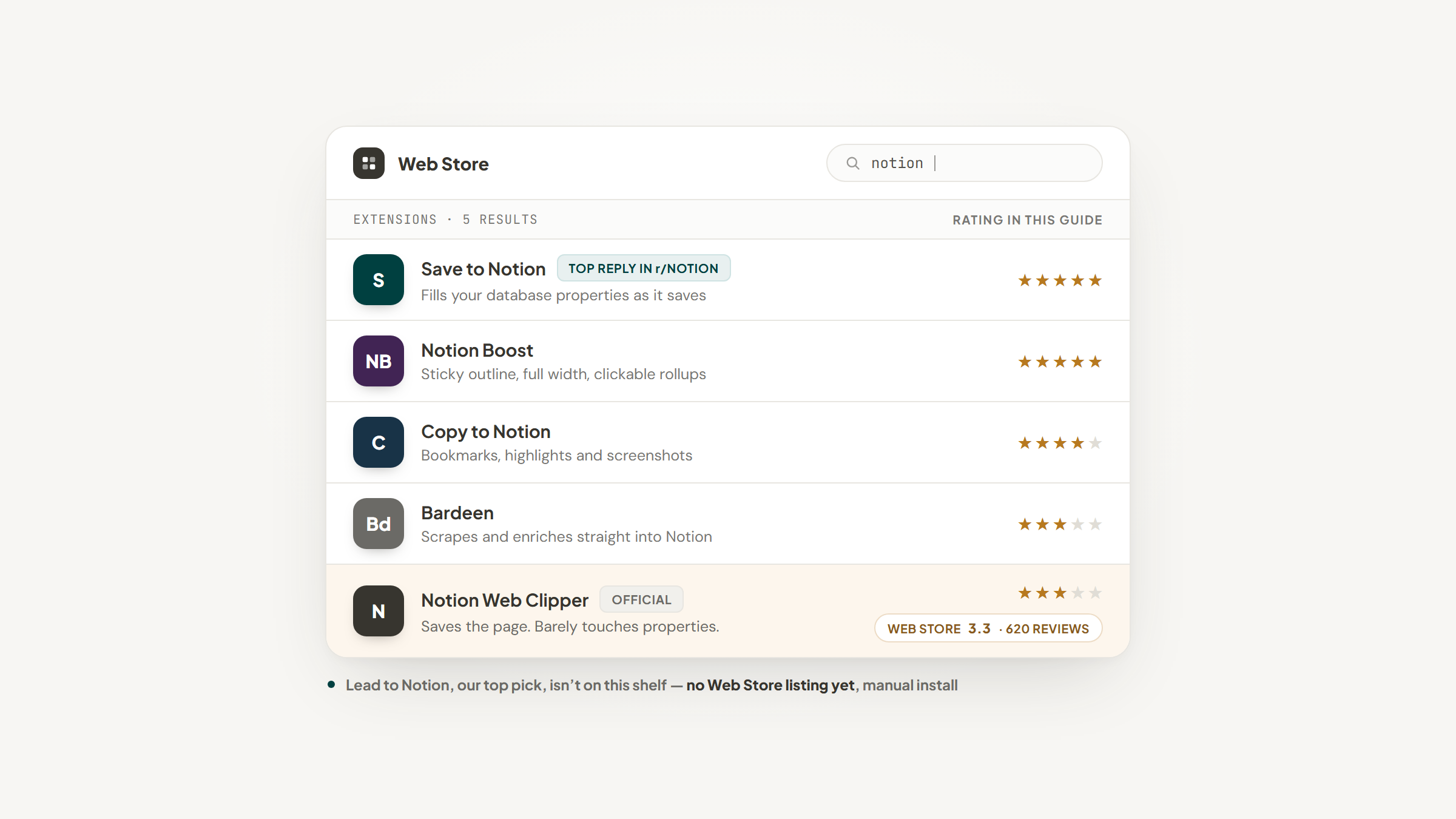
Notion ships as a very good blank page. What it does not ship with is a fast way to get things into it, which is why almost everyone who uses Notion seriously ends up installing Notion add ons alongside it.
The market for add ons for Notion covers more ground than most people realize: browser extensions that capture pages and leads, interface tweaks that fix Notion's defaults, forms that write into your databases, sync engines that keep Notion aligned with other tools, and publishing layers that turn a page into a website.
This list covers ten that are worth your time in 2026, with the price each one actually charges and, unusually for a roundup like this, when each was last updated. That second detail matters more this year than it ever has, for a reason covered further down.
What Are Notion Add Ons?
A Notion add-on is any third-party tool that extends Notion without being part of it. Most are Chrome extensions, some are web services that talk to Notion through its API, and a couple are official companion apps from Notion itself.
Every one of them works the same way underneath. You grant the tool access to a specific database or page through a Notion integration, and it reads and writes there on your behalf. Nothing in Notion changes; the add-on simply does something Notion does not.
That architecture is why the good ones feel invisible and the bad ones feel fragile. An add-on cannot alter how Notion works, only what reaches it, so the useful question about any of them is what job it removes from your day.
That framing also explains why some jobs need an add-on at all. Pulling email into a Notion database is the clearest example, and the routes that still work changed this year, as we set out in our Gmail guide.
The Best Notion Add Ons in 2026
The ten below span capture, interface, forms, sync and publishing. Pricing is the figure on each vendor's own page as of 19 August 2026, and version dates come from each extension's Chrome Web Store listing.
Tool | Best for | Key features | Main limitation | Pricing (from) | Rating |
|---|---|---|---|---|---|
Lead to Notion | Saving leads into a Notion CRM | One-click lead capture, duplicate guard, weighted pipeline view | Manual install, not in the Web Store | $0 (free forever) | ★★★★★ |
Save to Notion | Clipping pages with properties filled | Property filling on save, template support, highlights | Best features sit behind the paid tier | $0 (free tier) | ★★★★★ |
Notion Web Clipper | Saving a page with zero setup | Official tool, one-click save, works everywhere | Barely touches database properties | $0 (free) | ★★★☆☆ |
Copy to Notion | Clipping on a budget with volume caps | Bookmarks, highlights, screenshots into Notion | Monthly caps on notes and screenshots | $0, then $3.75/month | ★★★★☆ |
Notion Boost | Fixing Notion's interface defaults | Sticky outline, full width by default, clickable rollups | Cosmetic only, changes no data | $0 (free, open source) | ★★★★★ |
Notion Calendar | Seeing database items beside meetings | Google, Outlook and iCloud sync, desktop and mobile apps | Cannot import events into a database | $0 (free) | ★★★★☆ |
NoteForms | Collecting submissions into a database | Unlimited forms and submissions free, embeds anywhere | File uploads need a paid plan | $0, then $20/month | ★★★★☆ |
Super | Publishing a Notion page as a website | Custom domain, free SSL, fast page loads | Analytics billing scales with traffic | $0, then $16/month | ★★★★☆ |
Whalesync | Keeping Notion in step with another tool | Two-way sync, unlimited mappings, Airtable and Webflow | Priced well above the browser extensions | $40/month | ★★★★☆ |
Bardeen | Automating repetitive browser work | Credit-based automation, scraping, enrichment | Now leads with lead sourcing, not Notion | $10/month | ★★★☆☆ |
Ratings weigh how well each tool does its stated job against what it charges and how actively it is maintained, so a free extension that does one small thing perfectly can outrank an expensive platform that does five things adequately.
Lead to Notion

Best for: Capturing leads into an existing Notion CRM
Overview: We built Lead to Notion because using Notion as a CRM works well right up until you copy and paste every lead by hand. A side panel opens beside whichever page you happen to be on, you complete one short form, and the lead arrives in your Notion database carrying its notes, deal value and pipeline stage.
The design decision that matters most here is that it adapts to your database rather than asking you to adopt ours. It reads your real column names and types, and the Select and Multi-select options it offers are pulled live from your own database, so what you pick always matches what is actually there.
No template gets installed and nothing needs restructuring. Renamed a column at some point? Point the mapping at the new name once, and that is the end of it. A half-typed lead is kept as a draft until you save it, so closing the tab mid-entry does not lose the work.
Lead to Notion is free forever, with no account, no server and no tracking. The integration secret sits on your own machine, and the only place it ever travels to is Notion's API.
Key features:
- One-click save from a side panel, so a lead takes about ten seconds rather than a tab-switching round trip
- Reads your database live, so your column names and Select options stay yours
- Before a card saves it looks for a matching profile or company address and tells you which entry already holds it
- Draft auto-save keeps a half-finished lead until you commit it
- Add note tab appends a date-stamped note and moves the card to a new stage
- Pipeline tab totals deal value by stage with a weighted forecast
Pricing: Free, $0 forever. No plans, no trials and no card on file, with unlimited leads and notes. You bring your own free Notion account, which is the only prerequisite.
Pros: genuinely free, adapts to your existing database, duplicate detection before save, nothing runs on our servers, open source
Cons: not in the Chrome Web Store yet, five fields are mandatory before a card will save, every card arrives in the Lead stage
How to start using it:
- Fetch the current release archive from GitHub and expand it into a folder you will not move later.
- Head to `chrome://extensions`, flip Developer mode on, choose Load unpacked, and select what you expanded.
- Generate an integration on notion.so/my-integrations and copy the Internal Integration Secret it gives you.
- Back in Notion, authorize that integration against your leads database from the ••• menu under Connections.
- Enter both credentials on the settings page, use Test connection to confirm Notion answers, then pair every field with your own column.
The setup guide covers each of those steps in more detail, including the Notion-side connection that people most often miss.
Worth being precise about what it is and is not. Your Notion database does the CRM work; the extension is only the capture layer on top. Nothing saves until Website, LinkedIn URL, Deal Value, Service and Source each carry a value, and the resulting card always opens at the Lead stage for you to reposition later.
Why it's a good Notion add on: It solves the specific friction that makes people abandon Notion as a CRM, which is the retyping rather than the structure. It also asks nothing of your existing setup, which is rare in this category.
Final verdict: If your pipeline already lives in a Notion database and the bottleneck is data entry, this removes it at no cost. Two things to be clear-eyed about: Notion is doing the CRM job here and we only fill it, and the install takes four clicks rather than one.
CTA: Download free and connect your database.
Save to Notion

Overview: The clipper most heavy Notion users switch to. Where Notion's official tool saves a page, Save to Notion fills in your database properties at the moment of saving, which is the difference between a bookmark and a usable record.
Key features:
- Fills database properties while saving, so the record arrives complete
- Template support, so a clipped page lands with your structure already applied
- Highlight capture, which pulls selected passages rather than whole articles
Pricing: There is a usable free tier, with a paid upgrade for heavier use. Version 4.3.2 was updated on 19 August 2026, making it the most actively maintained tool on this list.
Pros: property filling on save, template support, actively maintained
Cons: the strongest features sit behind the paid tier, more setup than the official clipper, another vendor holding database access
Why it's a good Notion add on: It fixes the single biggest weakness in Notion's own clipper. In one r/Notion thread on which extensions to use, the top-voted reply called it far more powerful than the Web Clipper, and a later commenter said saving to different databases with lookup fields filled replaced a separate read-later tool.
Notion Web Clipper

Overview: Notion's official browser extension, and the default most people install first. It saves any page to a Notion database in one click with no configuration at all, which is both its appeal and its ceiling.
Key features:
- Official and free, with nothing to configure before the first save
- Saves to any database you have connected
- Available across browsers with a consistent, minimal interface
Pricing: Free. Version 0.2.13 was updated on 3 July 2026, and it carries a 3.3 out of 5 rating from 620 Chrome Web Store reviews, the lowest of any browser extension on this list.
Pros: free, official, zero setup
Cons: minimal property handling, no templates, the weakest Web Store reviews here
Why it's a good Notion add on: It is the right choice if you want to save a page and nothing more. Anyone who needs the saved page to arrive as a structured record will outgrow it within a week.
Copy to Notion

Overview: A clipper that competes on price and breadth rather than depth. Alongside articles it handles bookmarks, highlights and screenshots, and it meters those by volume instead of locking them behind feature tiers.
Key features:
- Captures bookmarks, highlights and screenshots as well as full pages
- Volume-based limits rather than feature gates, so the cheap tier is genuinely usable
- Lifetime purchase options for people who dislike subscriptions
Pricing: Free forever at $0, then $3.75 a month billed yearly at $45, or $9.00 a month billed yearly at $108. The $45 tier allows 1,000 notes and highlights, 1,000 bookmarks and 100 screenshots a month. Version 0.20.2 was updated on 18 August 2026.
Pros: cheapest paid clipper here, screenshots included, recently updated
Cons: monthly caps rather than unlimited use, smaller user base than the alternatives, another integration to maintain
Why it's a good Notion add on: For under fifty dollars a year it covers more capture types than most tools twice the price, which suits researchers more than sales teams.
Notion Boost

Overview: Not a capture tool at all, but a set of small corrections to how Notion behaves in a browser. It adds a sticky table of contents, sets pages to full width by default, makes rollup URLs clickable and hides interface elements you never use.
Key features:
- Sticky page outline, which makes long documents navigable
- Full width and small text applied by default, removing two clicks per page
- More than twenty individual toggles you can enable one at a time
Pricing: Free and open source. Version 3.3.7 was updated on 3 June 2026 and it carries Chrome's Featured badge, with builds for Firefox, Brave and Edge alongside Chrome.
Pros: free, open source, no ads or analytics or trackers
Cons: cosmetic rather than functional, changes nothing about your data, needs installing on every browser you use
Why it's a good Notion add on: It is the rare extension that stores and sends no Notion data at all, and it removes a dozen daily annoyances for nothing.
Notion Calendar

Overview: Notion's separate calendar application, free and available on macOS, Windows, iOS and Android. It puts your Notion database items next to your actual meetings, which is useful when deadlines and calls compete for the same day.
Key features:
- Syncs Google, Outlook and Apple iCloud calendars in one view
- Shows Notion database items alongside scheduled events
- Desktop and mobile apps rather than a browser-only experience
Pricing: Free, with no paid tier.
Pros: free, official, syncs the three major calendar providers
Cons: cannot import calendar events into a Notion database, tablet experience is still unoptimized, another app to keep open
Why it's a good Notion add on: It closes the gap between what you planned in Notion and what your day actually looks like. Read Notion's own FAQ before assuming it does two-way sync, because it does not.
NoteForms

Overview: A form builder that writes submissions straight into a Notion database. It covers the job Notion's own forms handle awkwardly when you need the form embedded on your own site rather than shared as a Notion link.
Key features:
- Submissions land as rows in your chosen database, ready to filter
- Embeds anywhere, so the form can sit on your own website
- Database views included even on the free tier
Pricing: Basic is free at $0 with one user, one workspace, unlimited forms and unlimited submissions. Pro is $20 a month and Team is $49 a month, with two months off on yearly billing.
Pros: unlimited submissions on the free plan, embeddable, straightforward setup
Cons: no file uploads at all on the free tier, 10 MB cap on Pro, a second service holding database access
Why it's a good Notion add on: The free tier is unusually generous, and the real upgrade trigger is file uploads rather than volume, which makes the pricing easy to predict.
Super

Overview: Turns a Notion page into a genuine website on your own domain. You write in Notion, and visitors get a fast site that does not look like Notion or carry its URL structure.
Key features:
- Custom domain with automatic free SSL
- Page loads considerably faster than a shared Notion page
- Design controls that hide Notion's interface entirely
Pricing: A free site on a super.site subdomain costs $0. Personal is $16 a month and Pro is $28 a month, with custom builds starting at $50 plus modification fees.
Pros: real custom domains, genuinely fast, no code required
Cons: analytics billing rises automatically with combined traffic, another subscription per site, limited beyond marketing pages
Why it's a good Notion add on: It is the cheapest credible route from a Notion document to a public website, which suits small teams publishing documentation or a simple marketing site.
Whalesync

Overview: A two-way sync engine that keeps Notion aligned with Airtable, Webflow, Postgres and other systems. Change a record in either tool and it updates in both, including linked records and rich text.
Key features:
- Genuine two-way sync rather than one-directional import
- Unlimited mappings and row changes on every plan
- Real-time monitoring with error notifications
Pricing: Plans run $40, $80 and $200 a month, with a two-week free trial.
Pros: true bidirectional sync, no row limits, covers the main systems teams actually use
Cons: the most expensive tool here by a wide margin, overkill for a single database, sync conflicts need thought upfront
Why it's a good Notion add on: When Notion has to be one of two sources of truth rather than the only one, this is the category of tool you need, and the price reflects infrastructure rather than convenience.
Bardeen

Overview: A browser automation tool that can scrape pages, enrich records and push results into Notion. It is powerful and it has drifted, because its homepage now leads with finding and reaching leads rather than with Notion workflows.
Key features:
- Scraping and enrichment that write results into a Notion database
- Credit-based metering rather than per-seat pricing
- A large library of prebuilt automations to start from
Pricing: Basic is $10 a month with 100 credits, Premium is $50 a month or $480 a year with 1,000 credits, and Enterprise is custom. Scraping and web search cost one credit per row, enrichment costs three, and utilities and imports are free. Version 5.0.0 was updated on 19 June 2026.
Pros: flexible automation, predictable credit costs, no per-seat charge
Cons: Notion is now a secondary use case for the vendor, credits expire at each billing period, a steeper learning curve than everything else here
Why it's a good Notion add on: It remains the strongest option for pulling structured data off the web into Notion, provided you are comfortable that Notion is no longer the product's headline story.
How We Chose These Notion Add Ons
Every tool here was checked live rather than carried over from another roundup. That mattered more than usual this year, because two candidates did not survive the check.
Each candidate had to publish its pricing somewhere on its own site. One popular widget tool was dropped for failing that test, since a roundup that says "contact them" is not helping anyone budget. Each also had to still be doing the job it is famous for, which is how a repositioned vendor ended up with a caveat in its entry rather than a clean recommendation.
For browser extensions we read the Chrome Web Store listing directly and recorded the version number and last-updated date. One otherwise decent annotation extension was cut for having roughly eighty users, which is too small to call among the ten best in good conscience.
Finally, we opened every screenshot in this article by eye rather than trusting that the capture worked. That check is boring and it is the only thing that catches a page that loaded wrong.
Our own entry is held to the same standard as the rest, which is why Lead to Notion carries its manual-install caveat in the comparison table rather than only in the prose.
The Deadline Every Notion Add On User Should Know About
There is a date on the calendar that will quietly break some people's setups, and almost no roundup on this topic mentions it.
Google's own Manifest V2 support timeline states that on 31 August 2026, all remaining Manifest V2 extensions are removed from the Chrome Web Store. Extensions already installed on Chrome 138 or earlier stay installed, but they cannot receive updates and cannot be reinstalled once removed. For anyone on Chrome 139 or later, Manifest V2 extensions stopped working entirely some time ago.
The practical consequence is that an abandoned extension is now a liability rather than merely a stale one. If a tool you rely on has not shipped an update in a year, you should assume it will disappear from the store rather than assume someone is quietly maintaining it.
That is why every extension in this list carries its version and last-updated date. Save to Notion updated on 19 August 2026, Copy to Notion on 18 August, Notion Web Clipper on 3 July, Bardeen on 19 June and Notion Boost on 3 June. All five are being actively worked on, which is the single best signal available about whether a tool will still exist next year.
What to Look For in a Notion Add On
Feature lists are the easy part. Three other things separate an add-on you will still use in a year from one you uninstall in a fortnight.
The first is what it does with your data. Every add-on that writes to Notion holds an integration token, and that token can read everything in the databases you connected.
Google's Limited Use policy for Chrome extensions prohibits transferring or selling user data to advertising platforms or data brokers, and requires extensions to publish a statement confirming they comply. Look for that statement, and prefer tools that keep the token on your own device rather than on their servers.
The second is whether it adapts to your database or expects you to adapt to it. Tools that require a specific template will fight you the first time you rename a column, and you will rename a column.
The third is billing model. Per-seat pricing punishes teams, credit pricing punishes heavy users, and flat pricing is rare. Work out which of those describes you before comparing headline rates, and remember that a connector's cost sits on top of whatever the other system charges, a sum we work through for HubSpot and Notion.
None of these show up in a feature comparison, which is precisely why they are the ones that decide whether the tool survives contact with your actual workflow.
How Much Do Notion Add Ons Cost?
The spread here is wider than in most software categories, and it is worth understanding what you are paying for at each level.
Price band | What lives here | Examples of the job |
|---|---|---|
$0 | Browser extensions and official companion apps | Capturing pages and leads, interface fixes, calendar viewing |
$3 to $20 a month | Single-purpose paid extensions and light services | Higher clipping volumes, forms with file uploads, publishing a site |
$20 to $50 a month | Services with real infrastructure behind them | Team forms, larger publishing setups, automation credits |
$40 and up | Sync engines and data platforms | Keeping Notion and another system consistent in both directions |
The pattern is that browser extensions are cheap or free because they run on your machine, while anything that runs servers on your behalf charges accordingly. If your budget is tight, almost everything in the first band is genuinely usable rather than a crippled trial.
Note also that Notion's own API access is included on every plan, including Free, so the add-ons themselves are the only cost. What Notion charges more for is the workspace features around them, at $10 per member per month on Plus and $20 on Business, billed yearly.
Notion AI is the one exception people budget for wrongly, since it cannot be bought as a standalone add-on at all, a packaging quirk we unpick in our ChatGPT comparison.
Are Free Notion Add Ons Worth It?
Unusually for software, yes, and the free options here are not loss leaders waiting to trap you.
Notion Boost is free and open source, carries no ads or analytics, and stores no data. Notion Calendar and the Web Clipper are free because Notion makes its money on seats. Lead to Notion is free because it runs entirely on your own machine and costs us nothing to operate. NoteForms gives away unlimited forms and unlimited submissions and charges for file uploads instead.
Where free genuinely stops is infrastructure. Two-way sync, custom domains with SSL, and automation that runs while your laptop is shut all require someone else's servers, and nobody gives those away sustainably.
A reasonable strategy is to start free across the board, then pay only at the specific point where a free tool's limit is costing you real time. That point arrives later than most vendors would like you to believe.
Checking what the underlying platform already gives away is worth doing before you pay an add-on to supply it, since free tiers differ sharply between database tools, as our Airtable comparison shows.
Picking the Two or Three You Will Actually Use
Installing eight add ons for Notion is how people end up using none of them. The realistic setup for most Notion users is two or three tools that each remove a recurring task.
If you capture information from the web, take one clipper rather than three: Save to Notion if you want records that arrive complete, the official Web Clipper if you genuinely just want a bookmark. Add Notion Boost regardless, because it is free, harmless and fixes things you have stopped noticing are annoying. Then add exactly one workflow tool for whatever your actual bottleneck is, whether that is forms, publishing or sync.
Teams whose bottleneck is the sales pipeline rather than research have a slightly different shortlist, and the automation options inside Notion are worth exhausting before adding a paid third-party tool on top.
If the recurring task is retyping leads into a Notion CRM, that is the one we built for. Download free, connect your database, and let it read your own columns rather than imposing a template.
Setting up the integration and mapping your fields takes a few minutes, and nothing about it asks you to restructure a database you have already built.
Frequently asked questions
Start with Notion Boost, which is free and improves the interface without touching your data, and one clipper. The official Notion Web Clipper needs no setup at all, while Save to Notion takes ten minutes to configure and produces far more useful records. Add anything else only when you have felt a specific limitation.
Turn Notion into your CRM
Lead to Notion is a free Chrome extension. Save leads to your Notion database in one click, add notes, and track your pipeline. No account, no server.